
Every document, every format
Fictional documents, real conversions. Each sample below was converted by the same engine you get — flip through the source PDF and every export format, or download the files and try an import yourself.
Most converter sites show you a marketing screenshot. This page shows you the product's actual output. Every sample starts as invented data — a fictional bank, a fictional business, figures that reconcile — rendered into a PDF the way that region prints such documents. The same data then runs through FlowParse's real export code, producing the Excel workbook, the CSV, and for bank statements the QBO and OFX bank-feed files. What you download here is exactly what you would download after converting your own document: same sheets, same columns, same validation, same honesty about what is a figure read from the page and what is a derived total.
Use the samples the way an accountant would. Before signing up, open the Excel tab and judge the workbook itself: are the columns typed, is the running balance there, does the layout survive a pivot table. Before an import, download the QBO or OFX and push it through your software's bank-feed upload on a test account — five minutes with a fictional statement is cheaper than discovering a mapping problem with a real one. And if you are comparing converters, the comparison is simple to run: the arithmetic on this page is checkable with a calculator, so ask any other tool's sample output the same questions — where is the balance column, where are the named failures, what happens to a withheld tax or a refund.
Two things are deliberately absent. There are no real customer documents — those are never published, in any form, which is why the institutions here are invented and every page carries a SAMPLE watermark. And there are no inflated accuracy badges: the proof offered is arithmetic. The bank samples reconcile from opening to closing balance, the invoices satisfy their three identities, the payout reports tie gross to payouts to the cent — because the fixtures are built to the same standard the product holds your documents to.
Bank statements
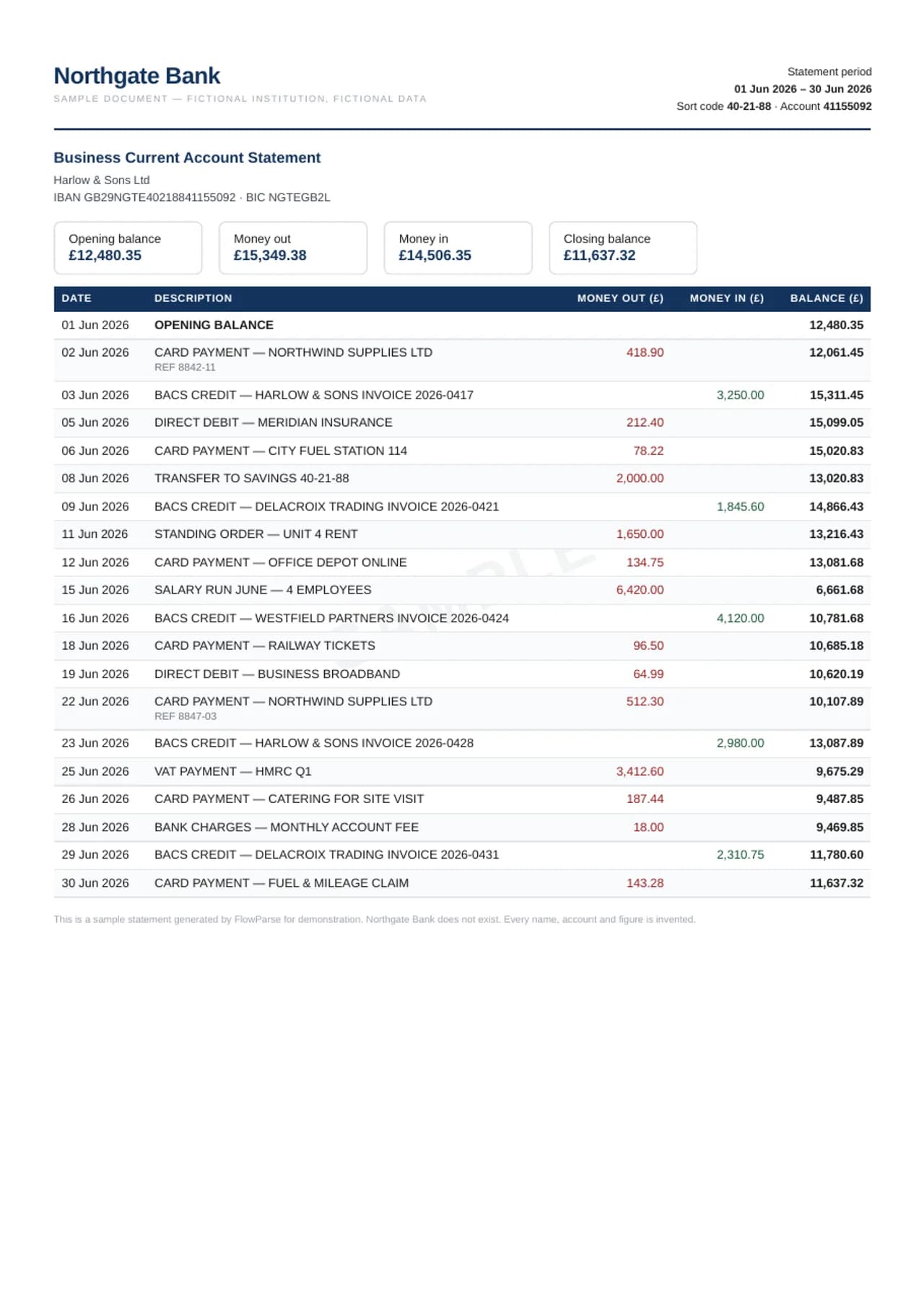
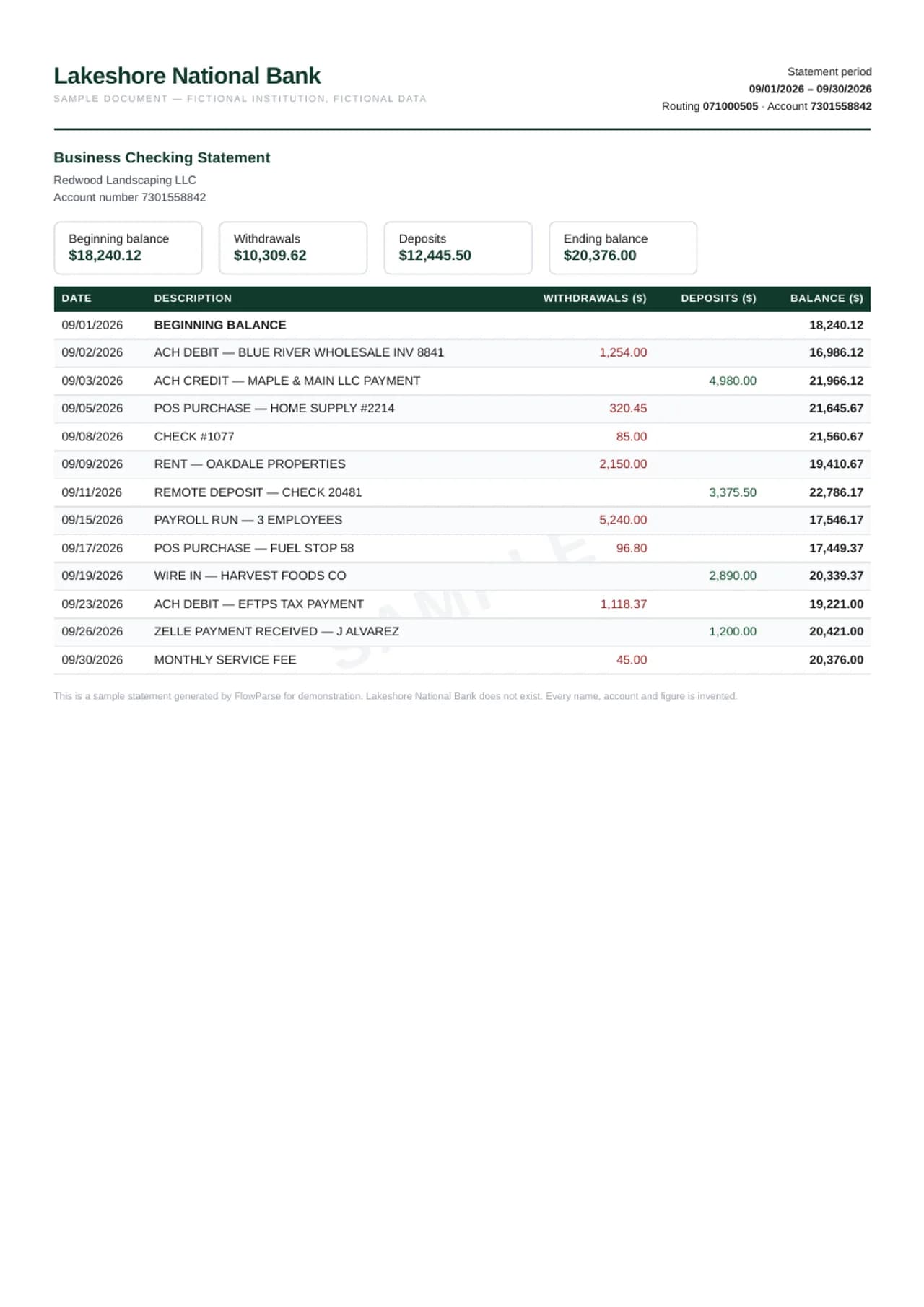
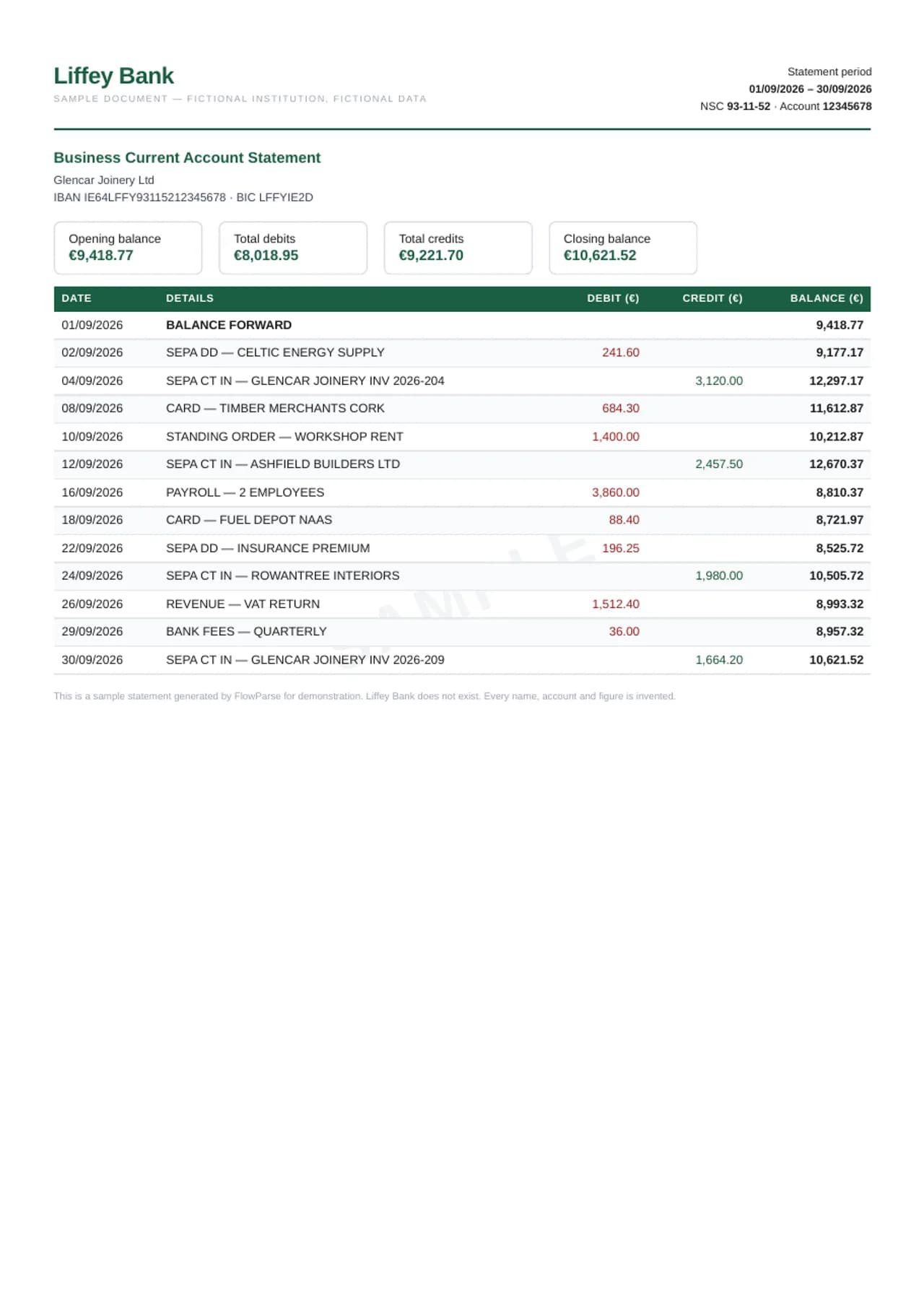
Four English-language styles, one discipline: the running balance must reconcile from opening to closing, and it does — row by row. The UK statement speaks BACS and sort codes with DD/MM dates in pounds, the US one ACH, routing numbers and MM/DD dates in dollars, the Irish one SEPA, NSC and IBAN in euro — the sample the English pages about euro-area banks and formats (MT940, camt.053, DATEV) use — and the app-bank statement shows the modern single-column layout neobanks print. The regional details are not decoration — they are exactly what trips generic converters: a DD/MM date read as MM/DD silently shifts a month of transactions, a debit column mistaken for a generic amount flips every sign. Each sample exists to show those details handled. Flip each sample through Excel, CSV, QBO, QFX, OFX, MT940, XML and Tally XML.
Bank statement (UK style)
Bank statement (US style)
Bank statement (Irish style)
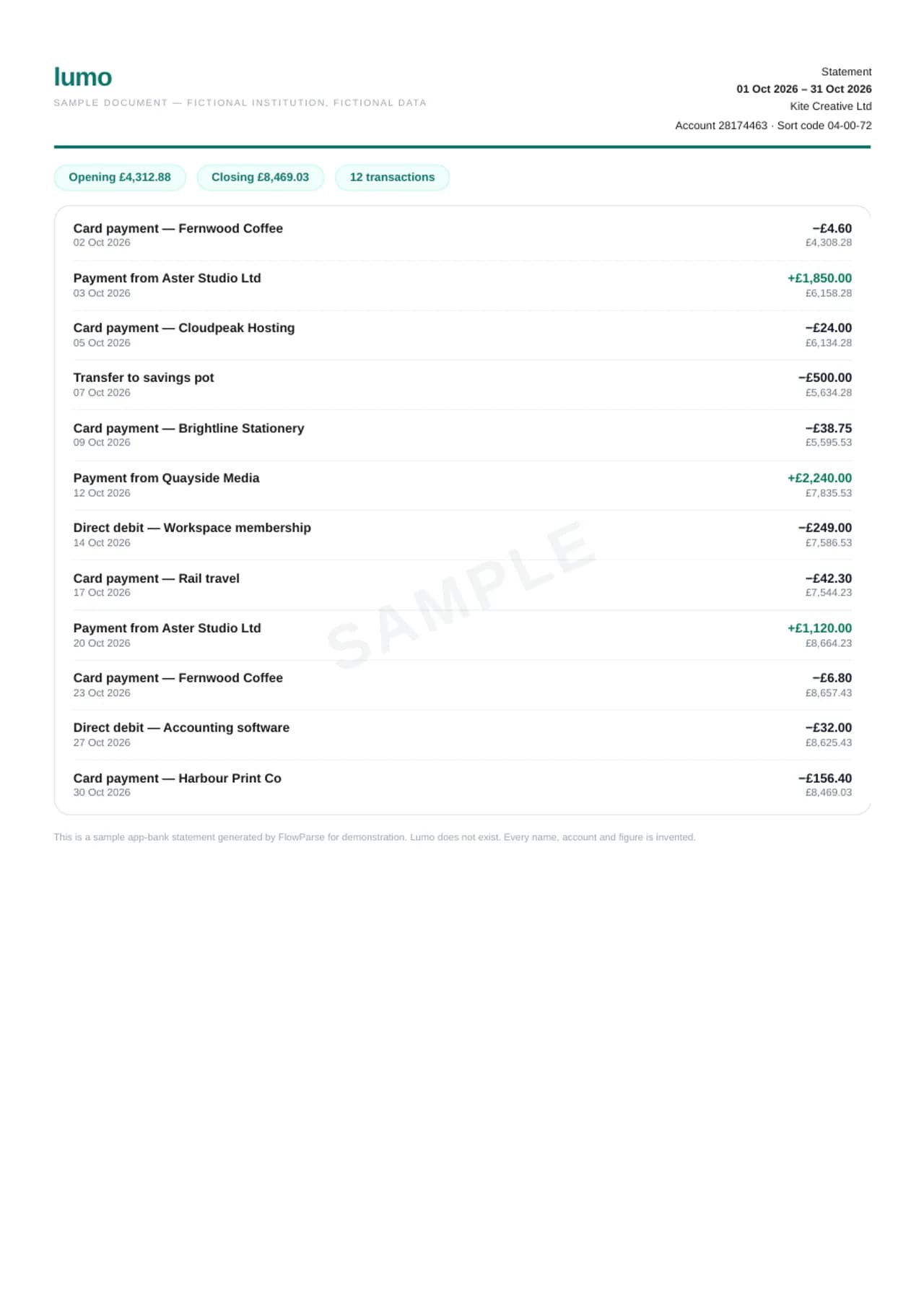
Smart Merge — six statements, one workbook
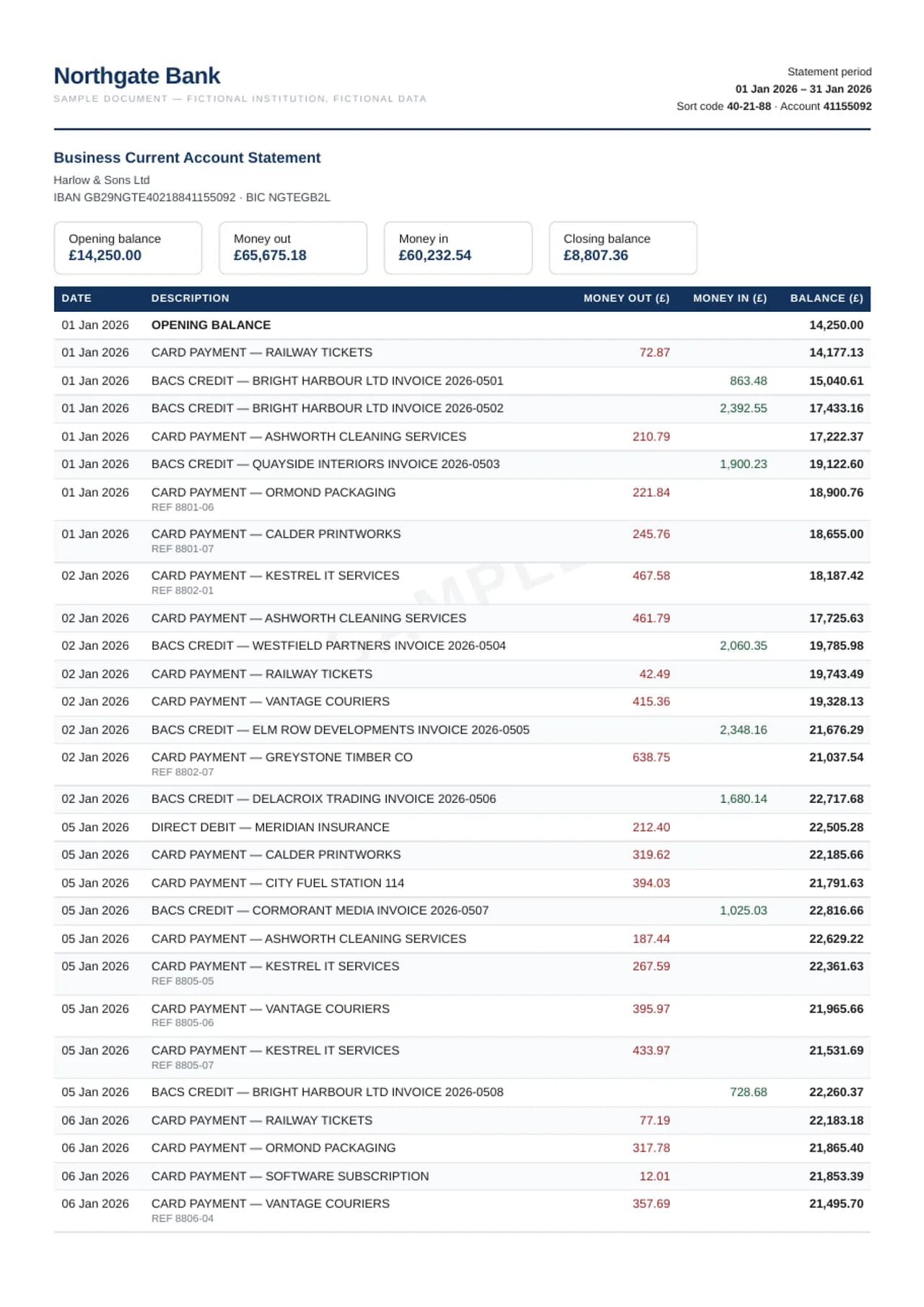
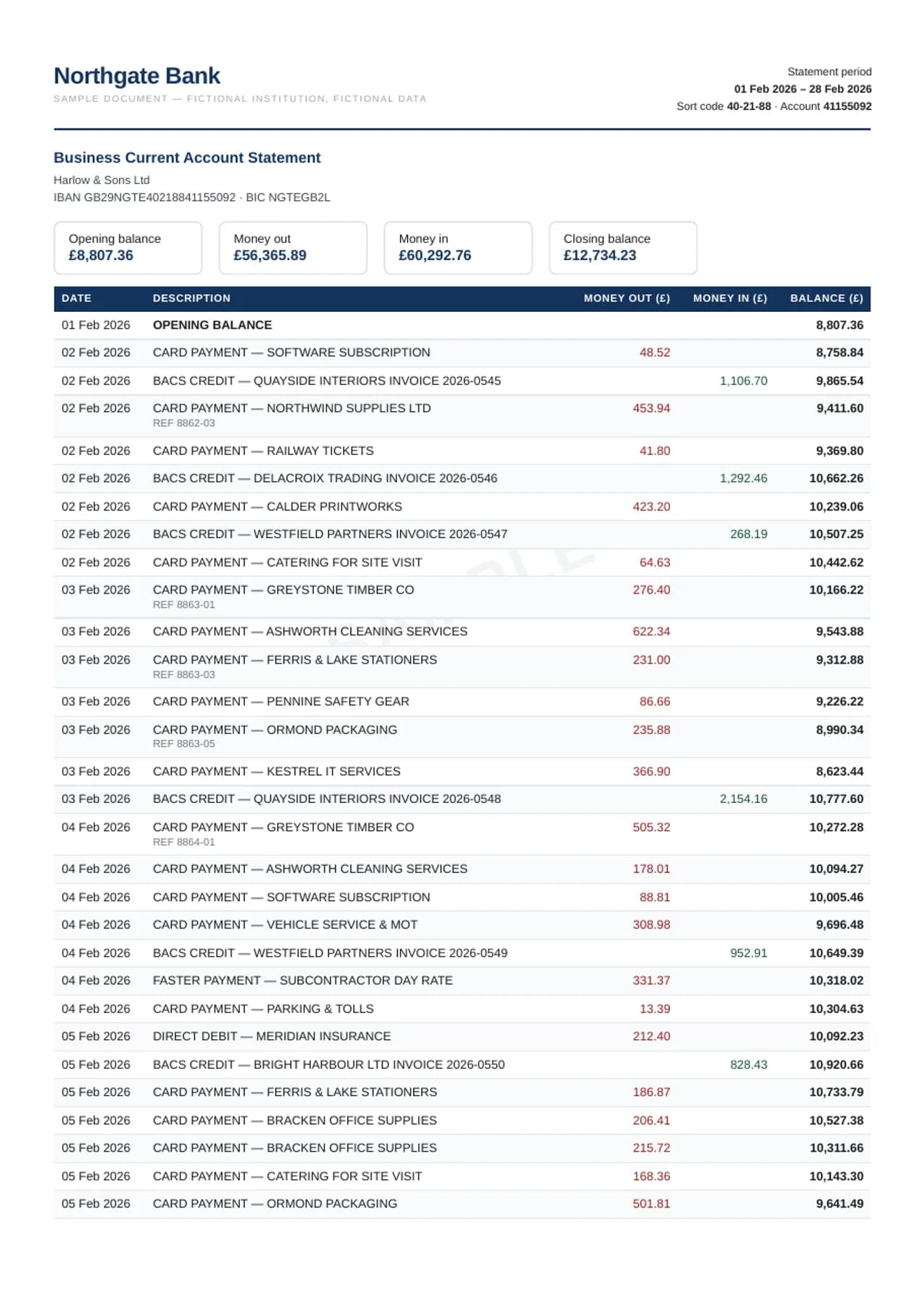
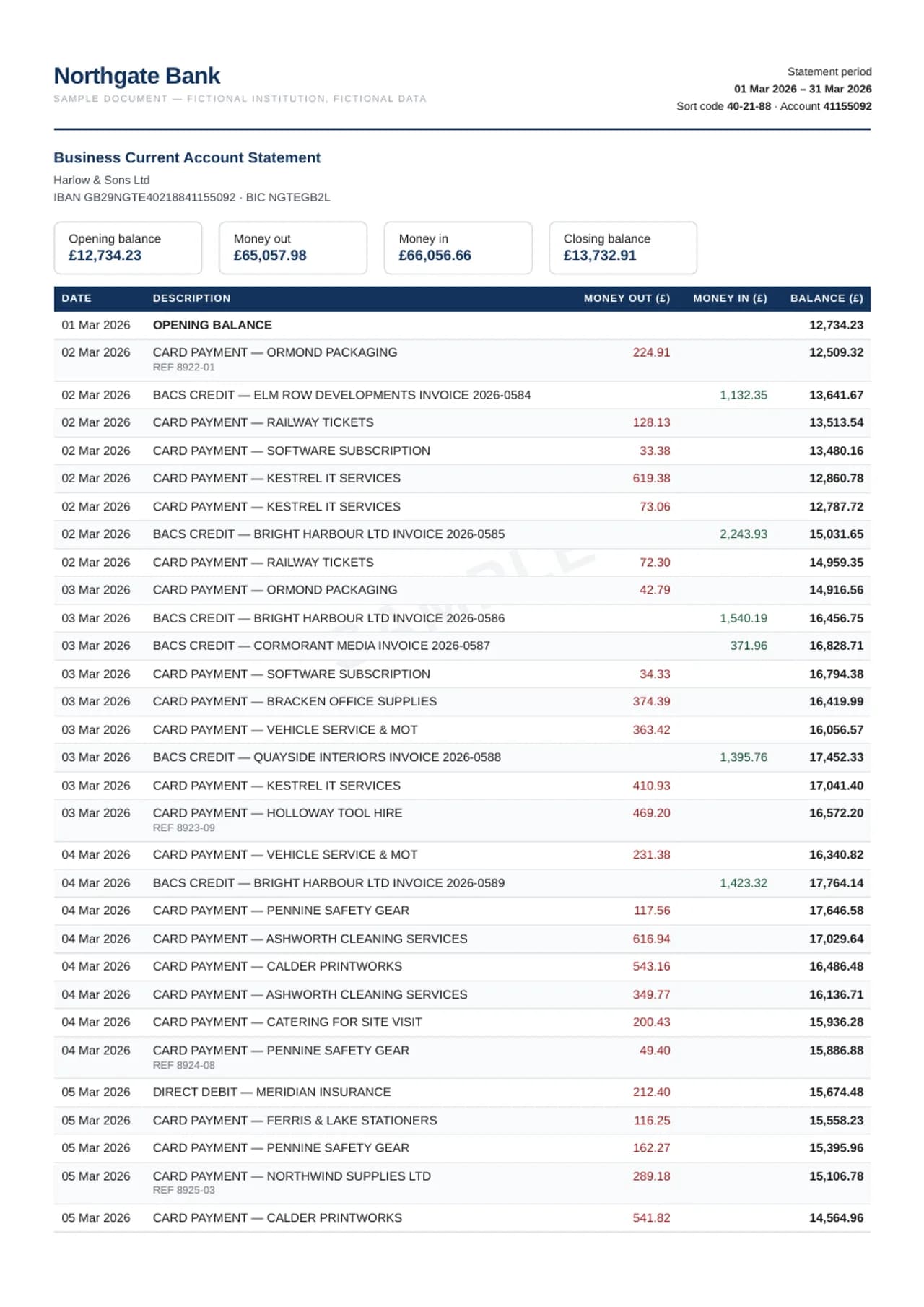
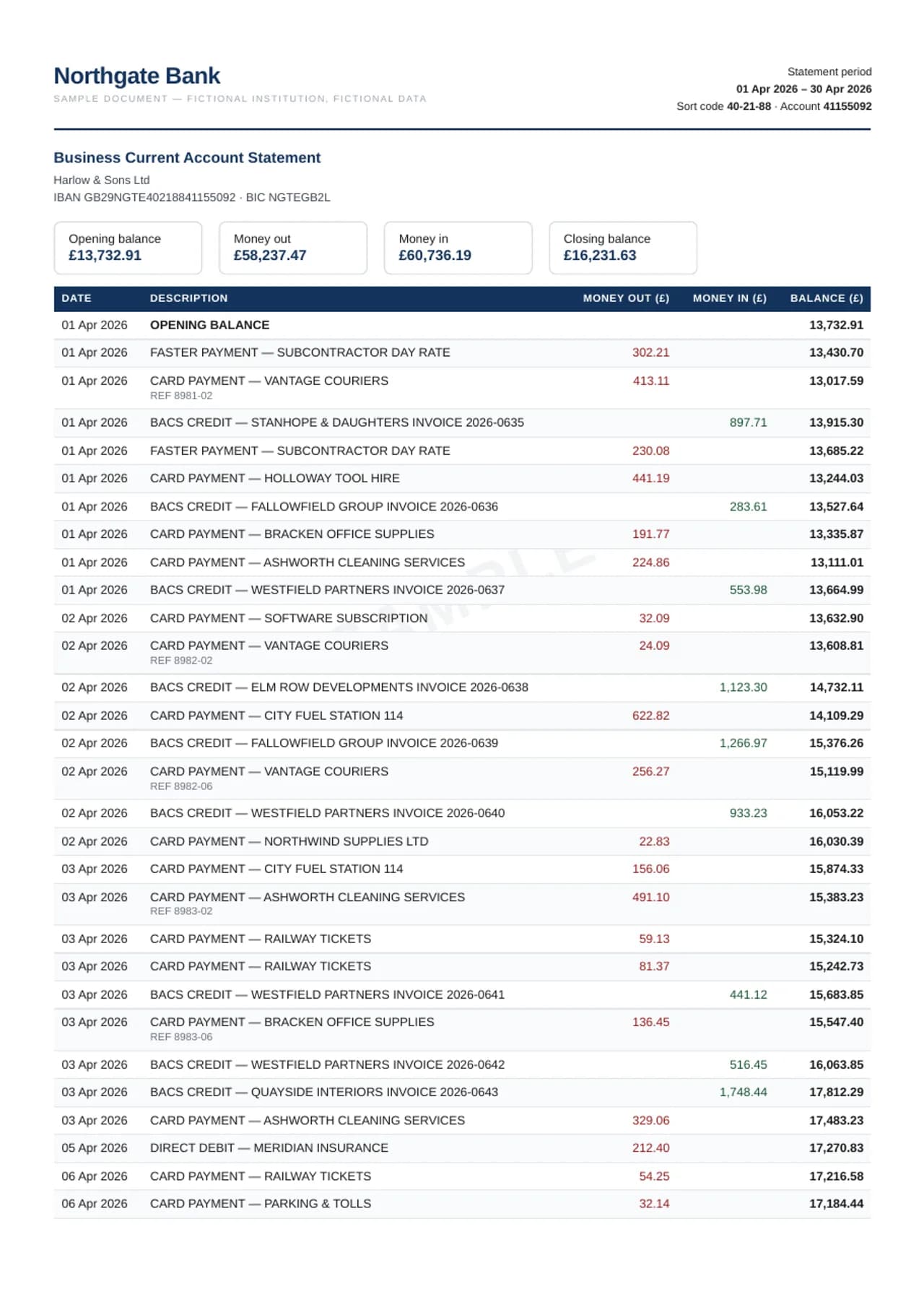
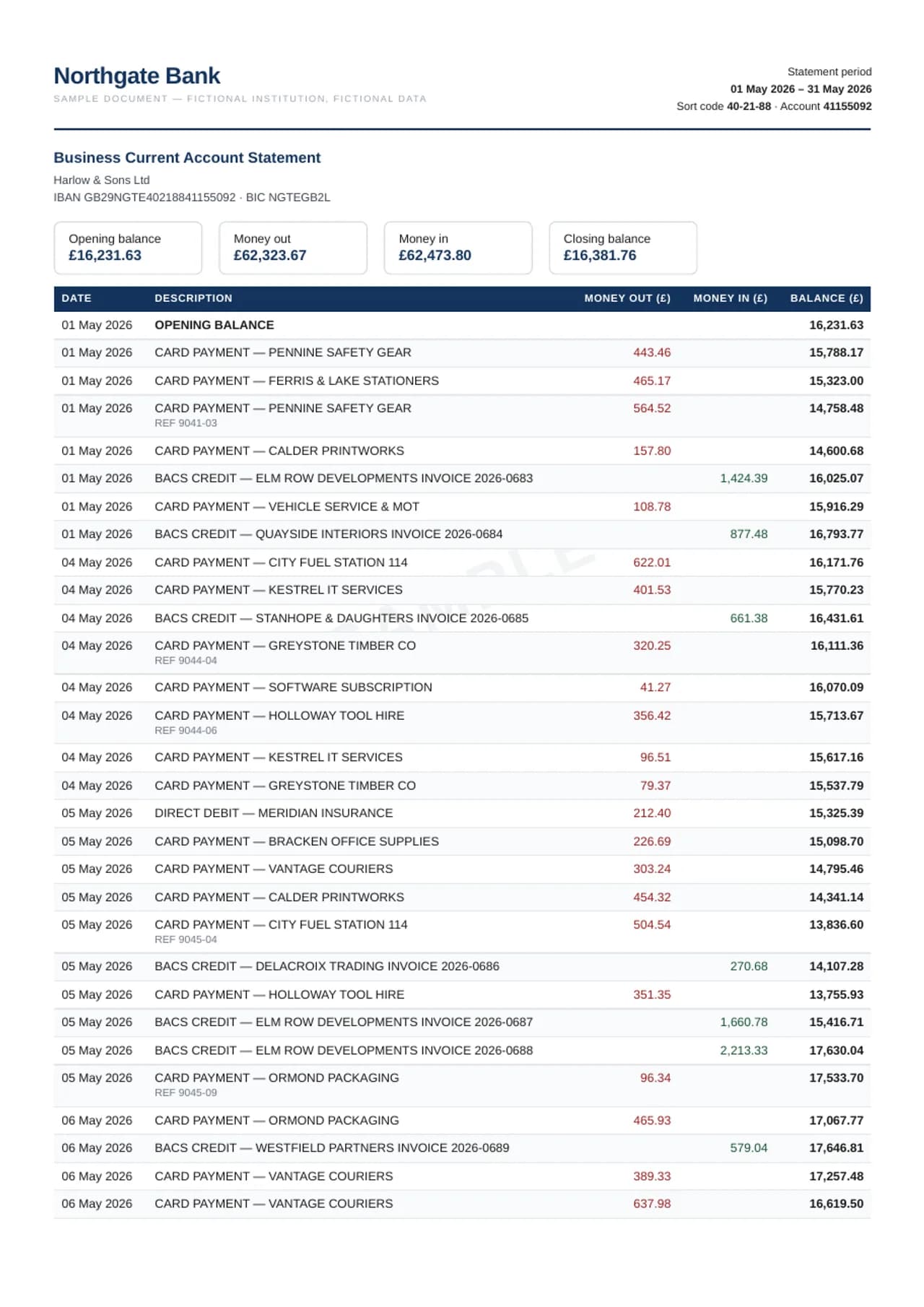
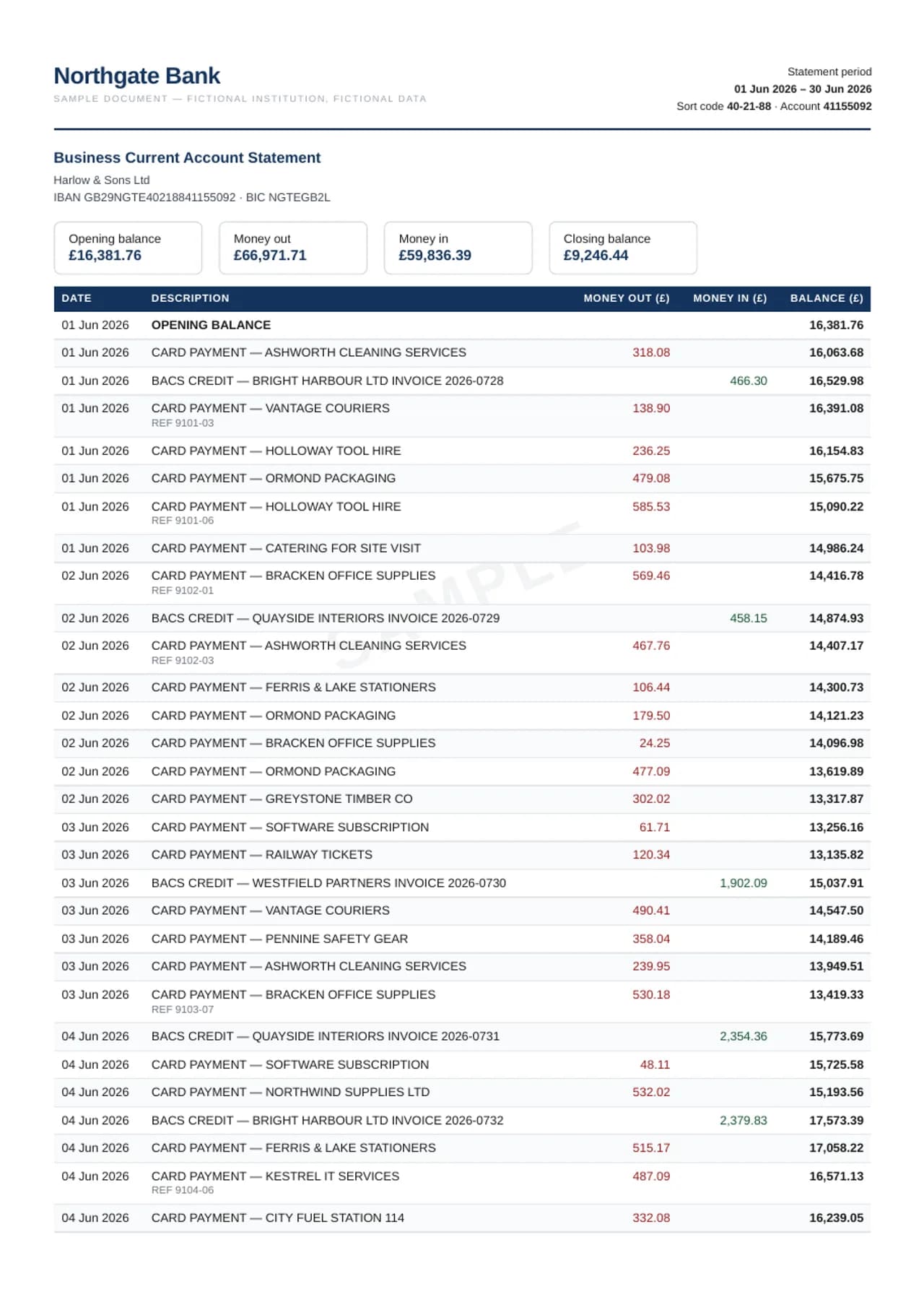
The merge sample is six consecutive months of the same fictional business account — 161 to 189 transactions per statement, over a thousand rows in all — combined by the product's real consolidation engine into one workbook. Two things are worth checking with a calculator. First, the balances chain: each month's closing balance is the next month's opening, and every running balance inside each statement reconciles, so the combined ledger is one unbroken arithmetic sequence from January's opening to June's closing. Second, provenance survives the merge: the first column of every row names the source file it came from, which is what makes a merged year auditable instead of a soup. The downloads are the six source PDFs in one zip, the merged Excel, the same ledger as CSV, and a single QBO bank-feed file covering the whole half-year — the file you'd import instead of uploading six statements one by one.
Six statements merged into one
Your own template — statements and invoices in your columns
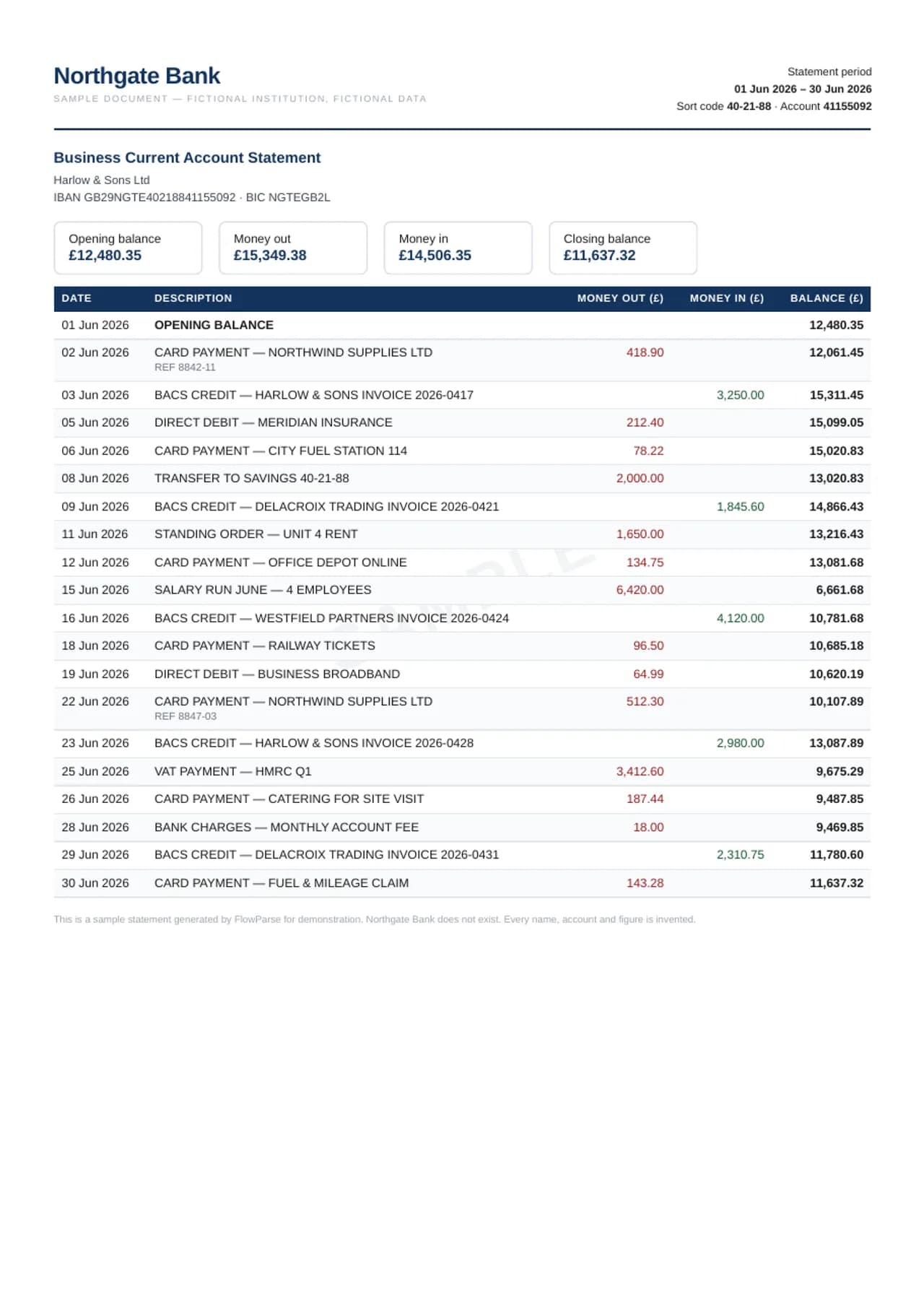
Many teams don't want our column layout at all: they have a spreadsheet their bookkeeping already runs on, and every statement has to be pasted into it by hand. An export template removes that step. The sample template here is an ordinary Excel file with one header row — Booking date, Details, Money out, Money in, Running balance, Cost centre — and the same UK statement as above, converted through it. Open the Column mapping tab first: five of the six headers matched a statement field (the headers are recognised in eight languages, so “Расход”, “Soll” or “Cargo” work just as well as “Money out”), and the sixth, Cost centre, has no counterpart on a bank statement — so in the output it is present, in its place, and empty. That is the rule, not an accident: a template column the document can't fill is never filled with a guess. Then open the Excel tab: the 19 transactions in exactly your order, debits and credits split into the two columns you asked for, ready to paste or import. Upload your own template once, in the dashboard, and every bank-statement Excel and CSV — single files and Smart Merge alike — comes out this way until you switch it off. The second sample does the same for an invoice. Its template — Vendor, Invoice No, Invoice Date, Due Date, Item, Qty, Unit Price, VAT Rate, Line Total, Gross, Project code — is recognised as an invoice template from its headers alone, because Invoice No, Qty and Unit Price are columns no bank statement has. The output is the layout most accounting and ERP import sheets ask for: one row per line item, with the supplier, invoice number and dates repeated on every row, and the gross total alongside each line so the rows can be checked against the document. The UK invoice's five lines become five rows; Project code, which no invoice prints, stays empty. A statement template and an invoice template can both be active at once — each is applied to its own kind of document, including receipts and purchase orders on the invoice side.
Statement in your own template
Invoice in your own template
Invoices
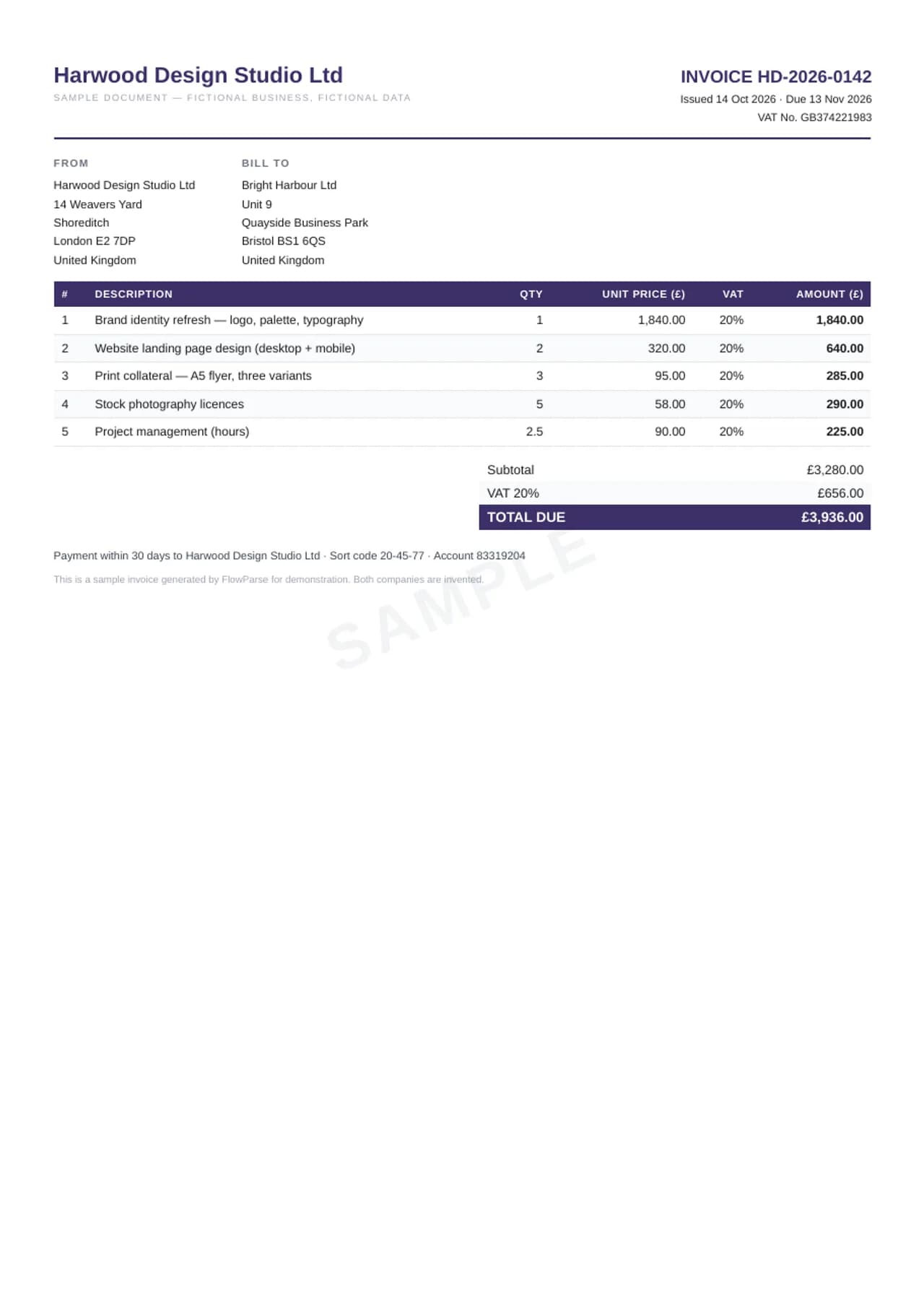
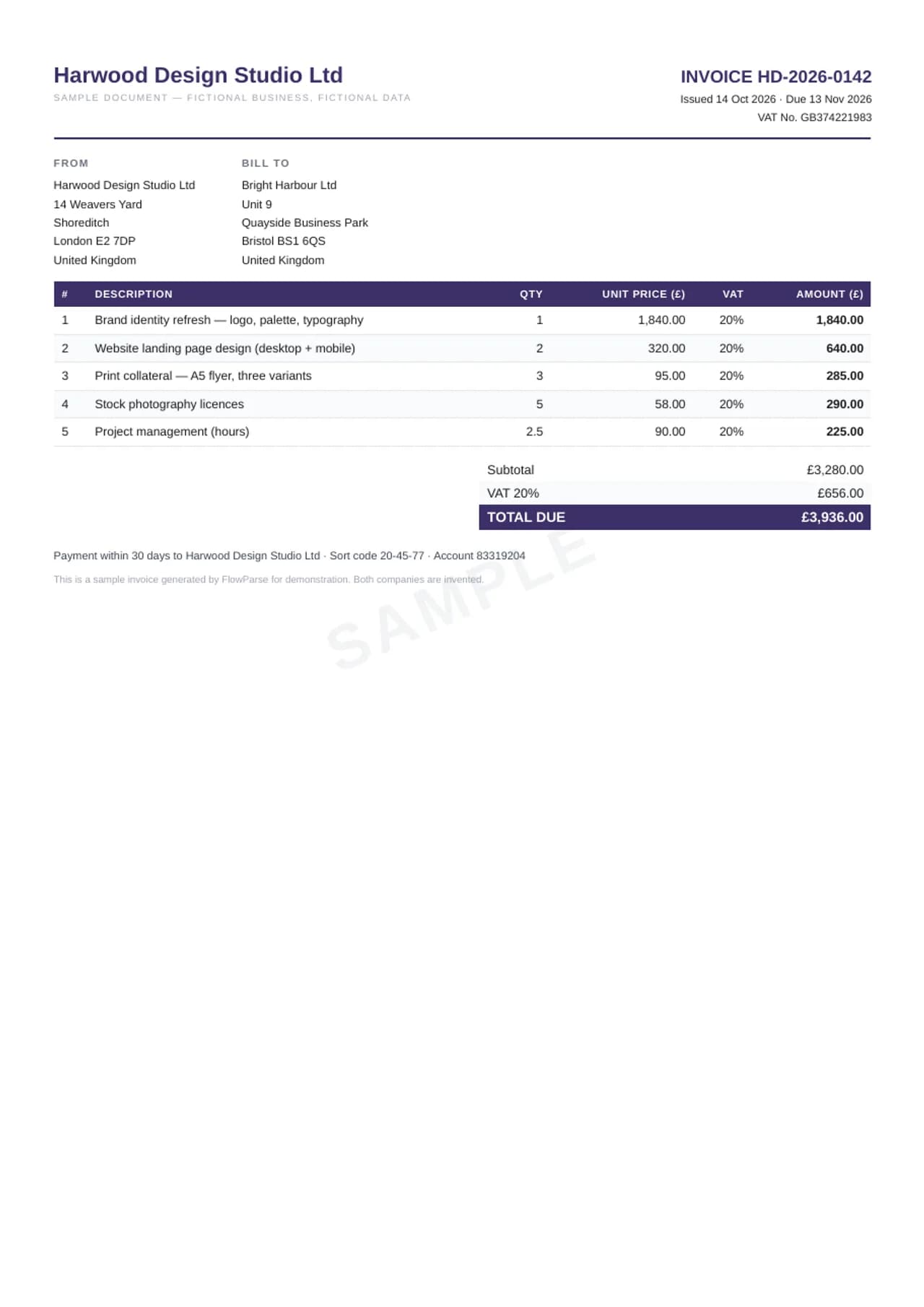
The invoice satisfies the three identities the product checks on every extraction: quantity × unit price equals each line, the lines sum to the subtotal, and subtotal plus tax equals the total. It is the common case — services billed with 20% VAT, five lines, a clean totals ladder that you can check with a calculator against the Excel tab. The VAT Audit sheet scores each invoice against deterministic rules: tax reconciling with the base, plausible rates, VAT number format, date sanity. No rule involves a model's opinion; every row of the audit is arithmetic or a format fact. Invoices in other languages live on the pages written in those languages — see the list at the end of this library.
VAT invoice
Credit card statements
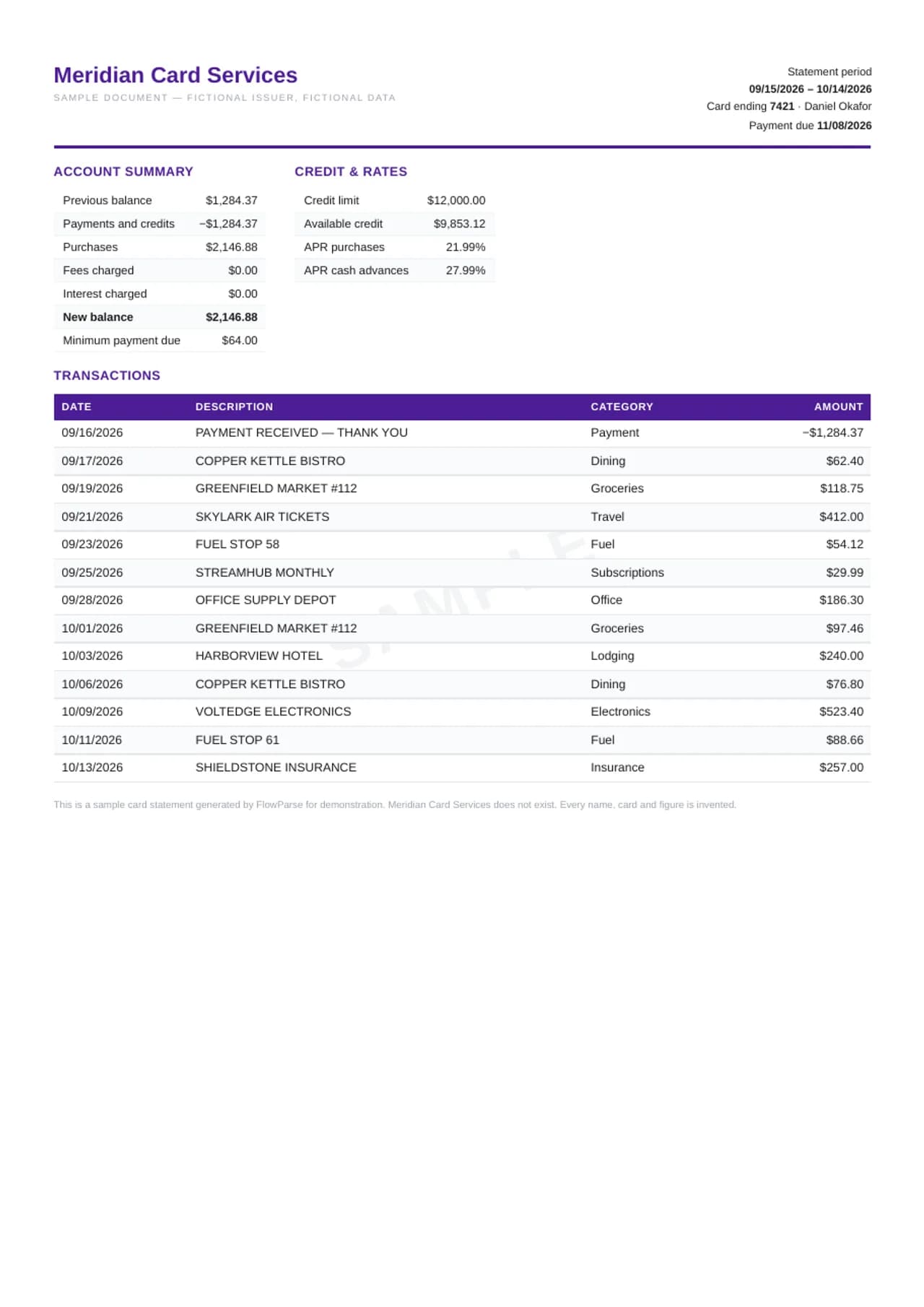
A card statement has no running balance — one opening and one closing figure frame the period, and the summary must tie: previous balance minus payments plus purchases, fees and interest equals the new balance. This sample does, to the cent: 1,284.37 carried in, the same amount paid off, 2,146.88 of new purchases, zero fees and interest, 2,146.88 owed. Every transaction carries the category a card statement prints — dining, groceries, travel, fuel — which is what makes the converted spreadsheet immediately usable for expense analysis rather than a flat list needing an hour of tagging. The export keeps charges and payments in one signed column, the way card accounting expects them, and does not invent a per-row balance the document never printed. The same statement also downloads as a QuickBooks .QBO, a Quicken .QFX and an .OFX bank feed, or as QuickBooks and Xero import CSVs — card amounts turned to the bank-feed convention, purchases as money out.
Credit card statement
Processor payout reports
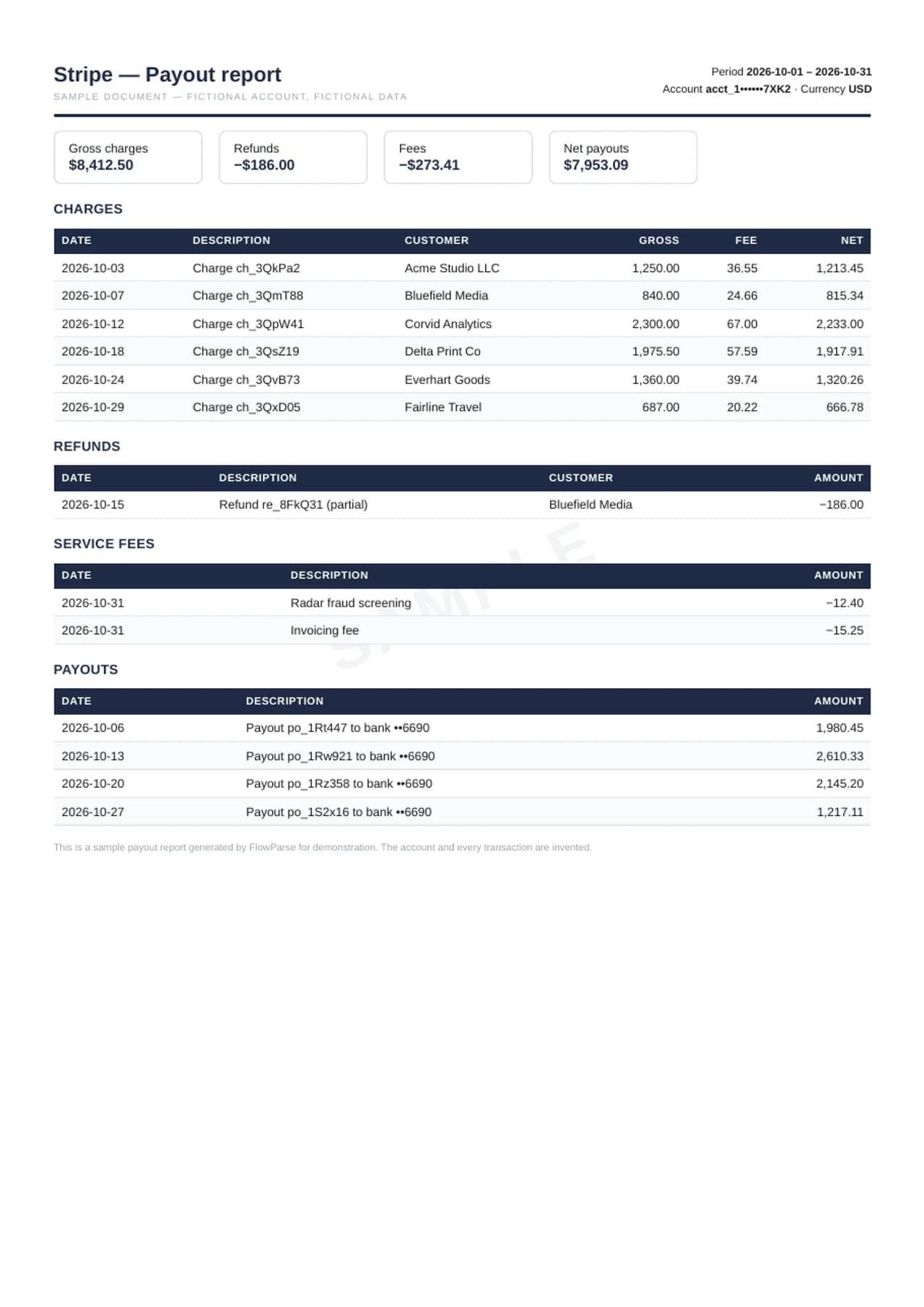
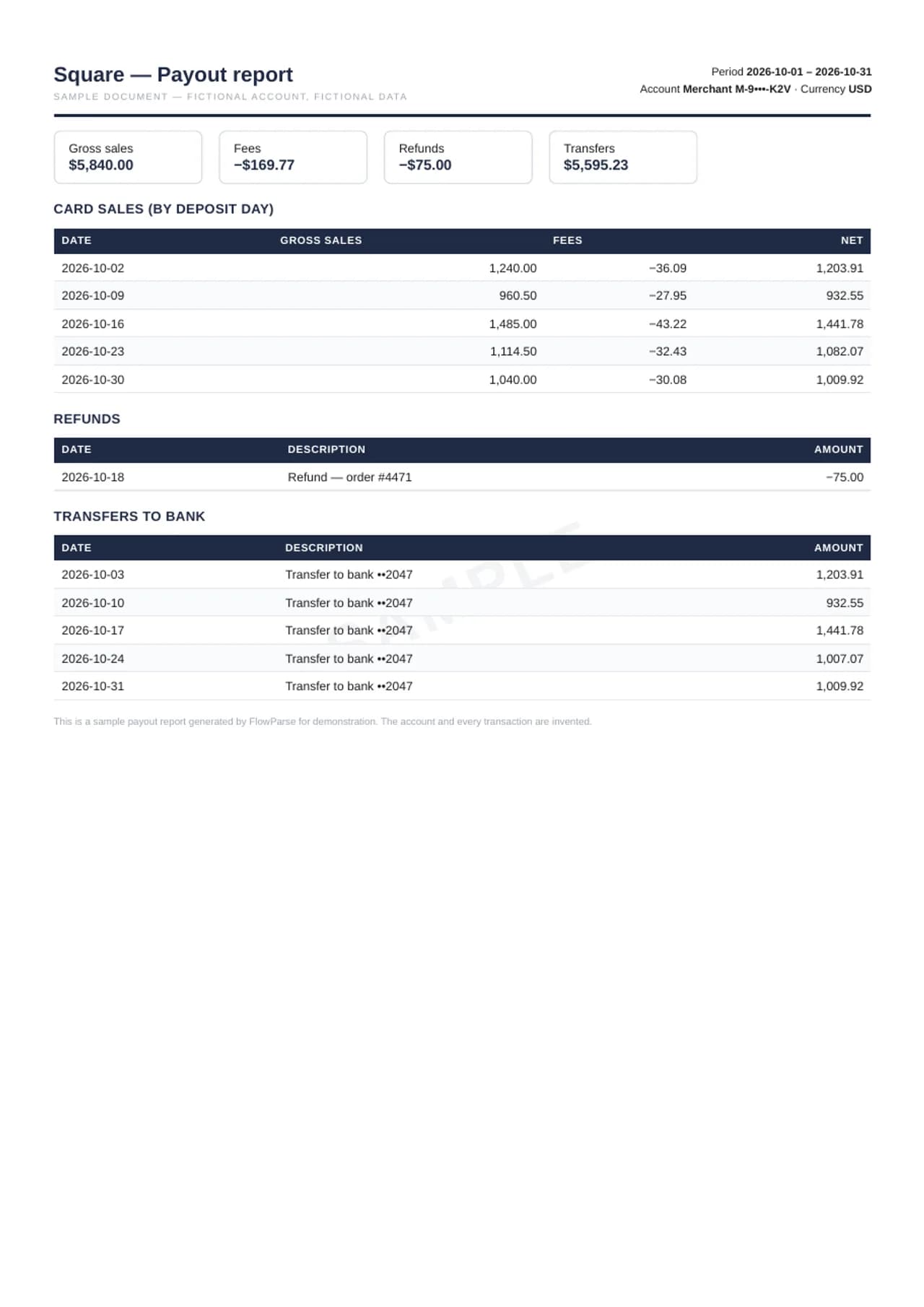
Stripe and Square reports answer one question: why the bank deposit is smaller than the sales. Both samples tie exactly — gross charges minus fees minus refunds equals the payouts, to the cent — and the Excel export mirrors the report's own structure: a Summary sheet, then one sheet per section, so charges, refunds, fees and transfers each land on their own tab instead of blending into one undifferentiated list. That separation is what makes month-end bookkeeping mechanical: gross sales post to revenue, the fee sheet posts to processing costs, and the transfers sheet is the list your bank statement's deposits should match line for line. The Stripe sample shows per-charge fees the way Stripe prints them; the Square sample aggregates by deposit day, the way Square's reports do — two genuinely different report shapes, one consistent workbook treatment. Both also export for a processor clearing account — as .QBO, .OFX, MT940 or a QuickBooks/Xero CSV — with sales as money in, refunds, fees and payouts to the bank as money out, so the clearing account nets to exactly 0.00 when the report ties. Open the QBO tab and count: all thirteen Stripe rows are there, not just the charges.
Stripe payout report
Square settlement report
Brokerage and crypto statements
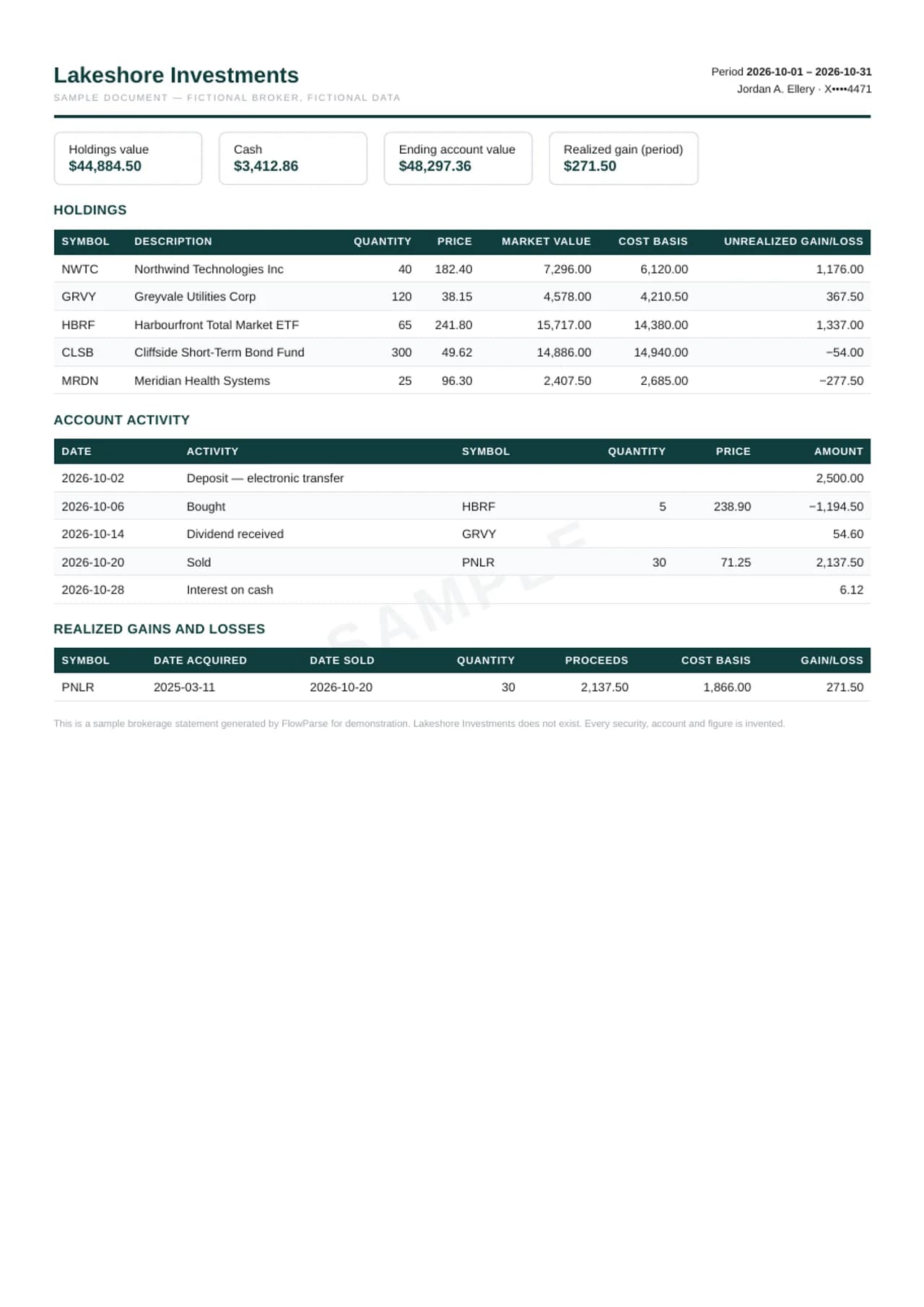
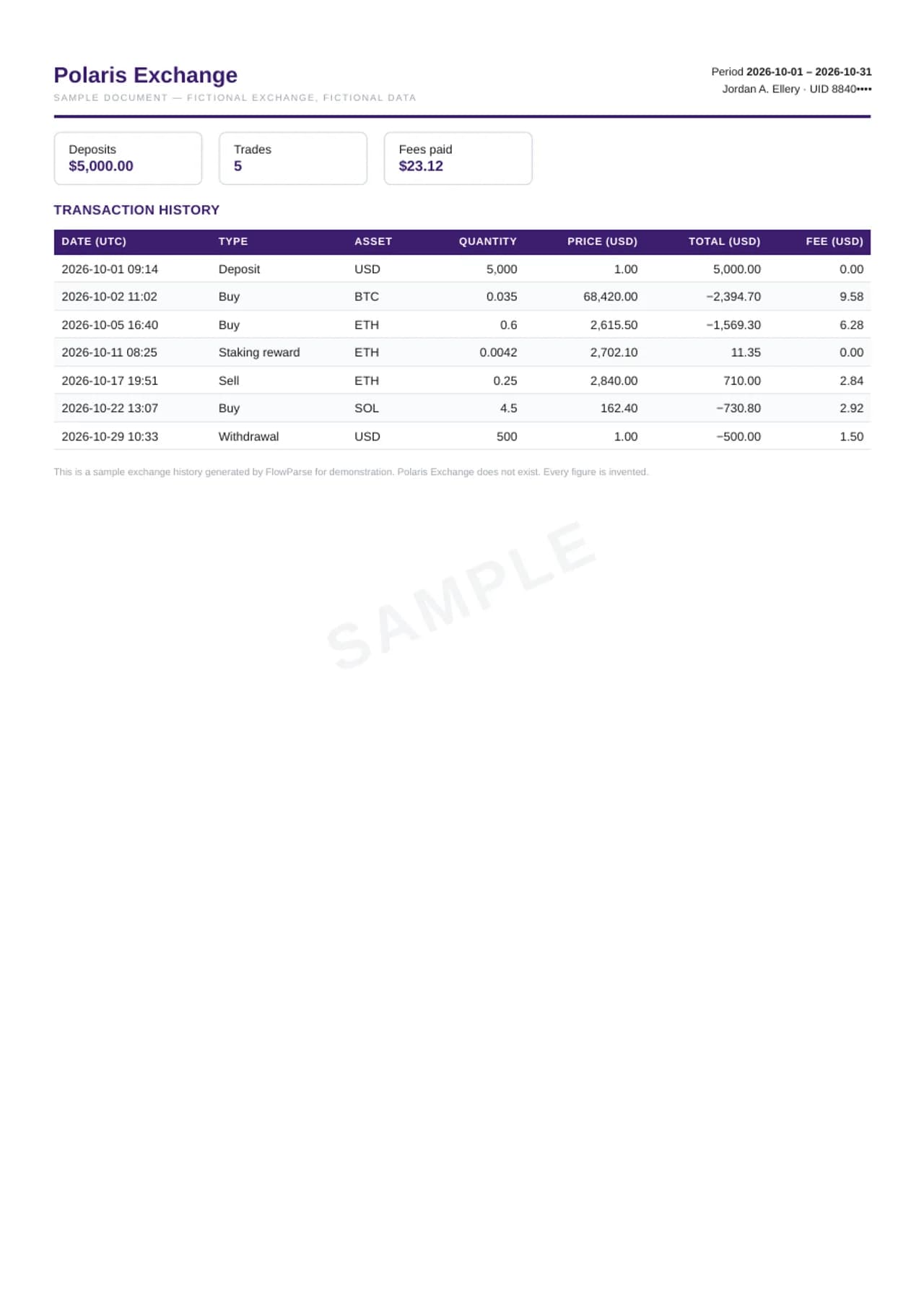
Investment statements are the opposite of bank statements in one important way: there is no single running balance to reconcile, and every section — holdings, account activity, realized gains — has columns of its own. So these samples are converted verbatim: each section keeps exactly the columns and figures it printed, in its own sheet, with nothing re-signed, re-labelled or summed into a total the document never showed. The brokerage sample is a US-style monthly statement with five holdings (quantity × price = market value on every row; holdings plus cash equal the ending account value printed in the summary, $48,297.36), a month of activity and one realized sale. The crypto sample is an exchange transaction history — deposits, buys, a staking reward, a sell and a withdrawal, with fees in their own column. Both export to Excel and CSV only, and that is deliberate: a holdings table is not a sequence of bank movements, so pretending it is a QuickBooks bank feed would put wrong numbers in your books. The CSV's All Figures block keeps every value under its own section's header.
Brokerage statement (US style)
Financial reports — trial balance, P&L and balance sheet
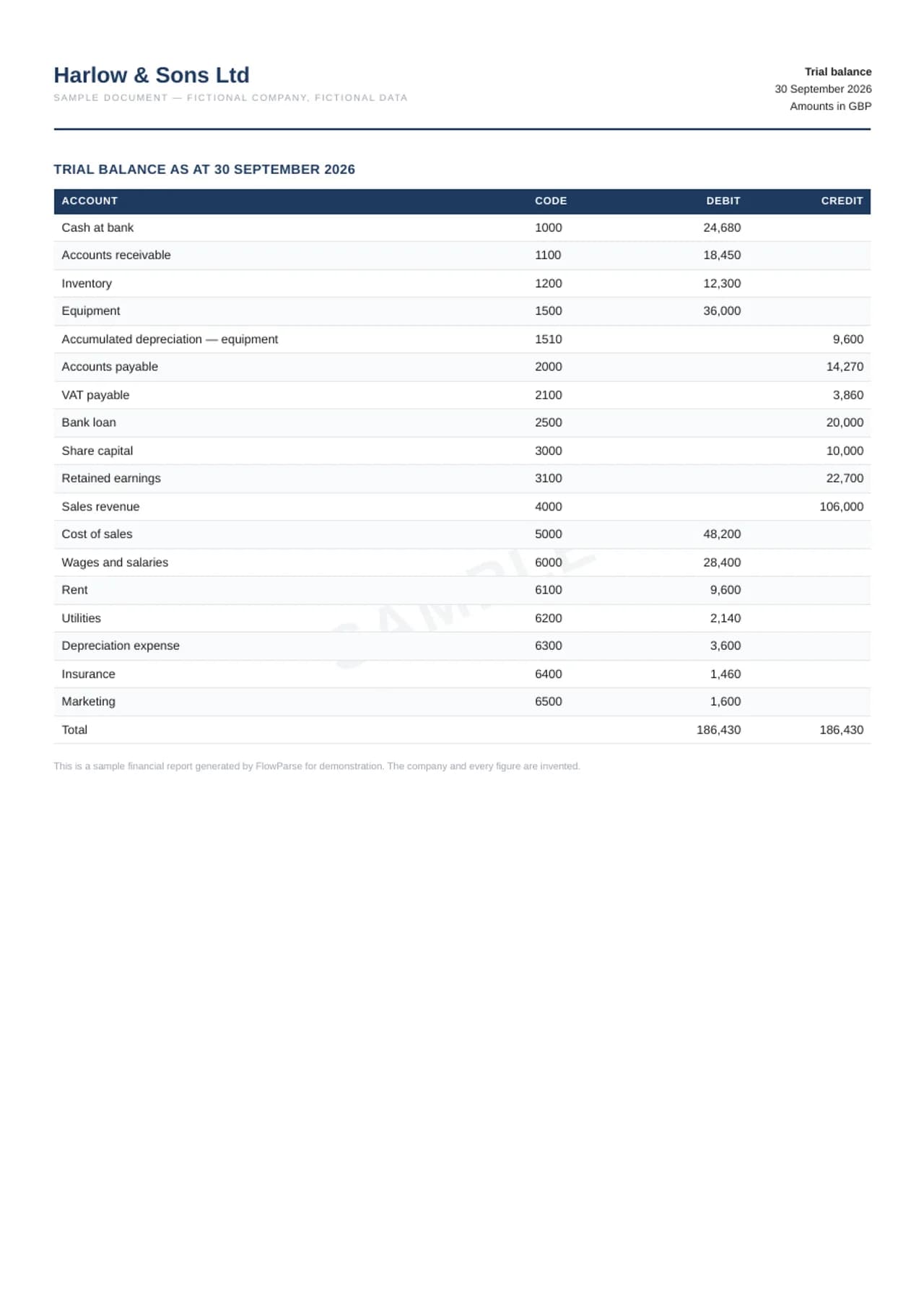
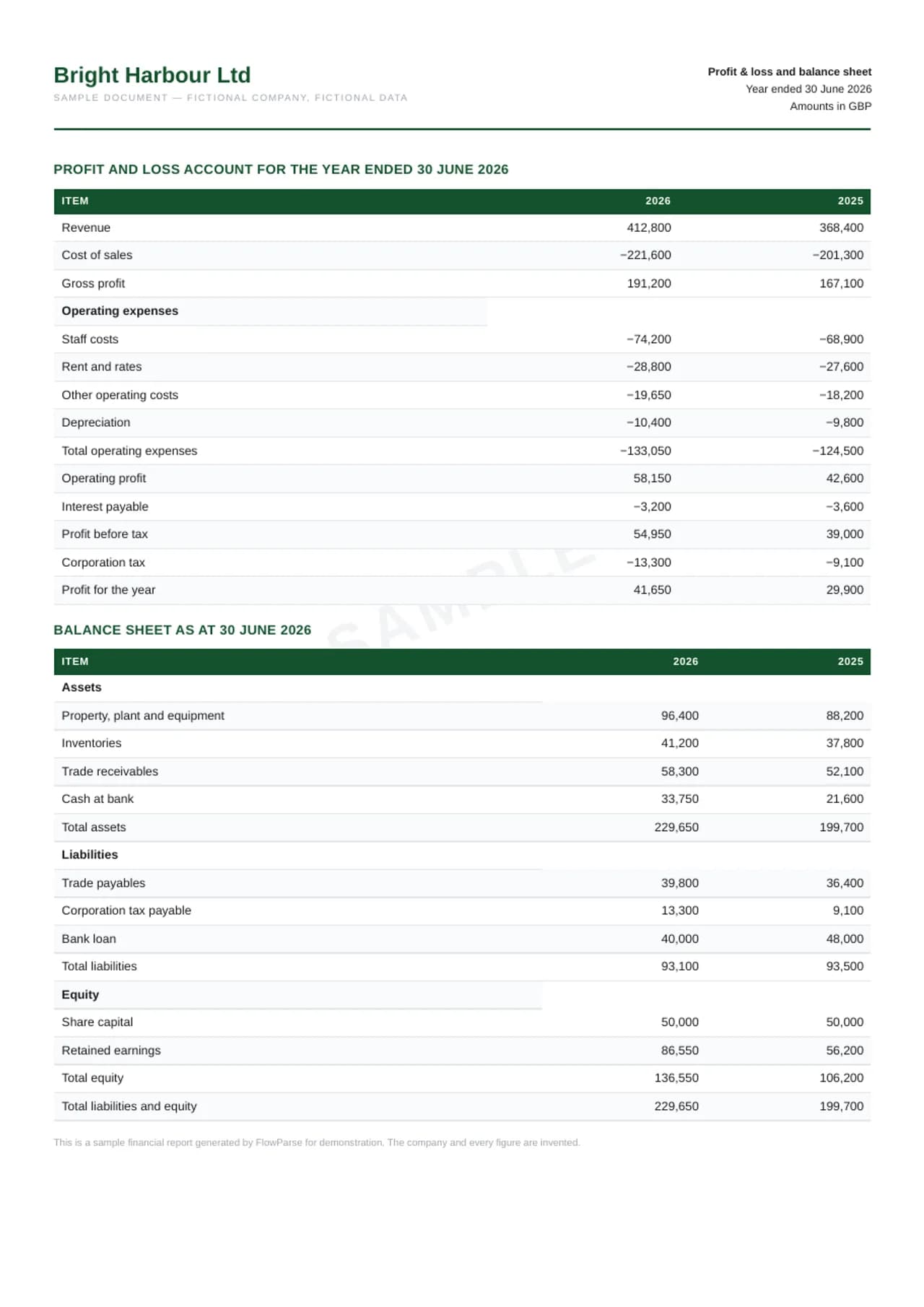
Reports carry their own arithmetic too, and the product checks it with the same three deterministic gates it runs on a real upload. The trial balance lists eighteen accounts with a debit or a credit each; the debit/credit gate confirms both columns sum to the same total — 186,430.00 — and the report gate re-adds the printed Total row. The second sample is a year-end pack: a profit and loss account for 2026 and 2025 (revenue less cost of sales to gross profit, operating costs to operating profit, interest and tax to profit for the year) and a balance sheet for the same two years, where the balance-sheet gate confirms total assets equal total liabilities plus equity in each. In the Excel tab every row keeps its printed label, group headings stay in place so the sheet still reads like the report, and both year columns stay side by side for comparison. These export to Excel and CSV; a P&L is not a bank feed, so no QBO is offered for it.
Trial balance
Purchase orders and supplier statements
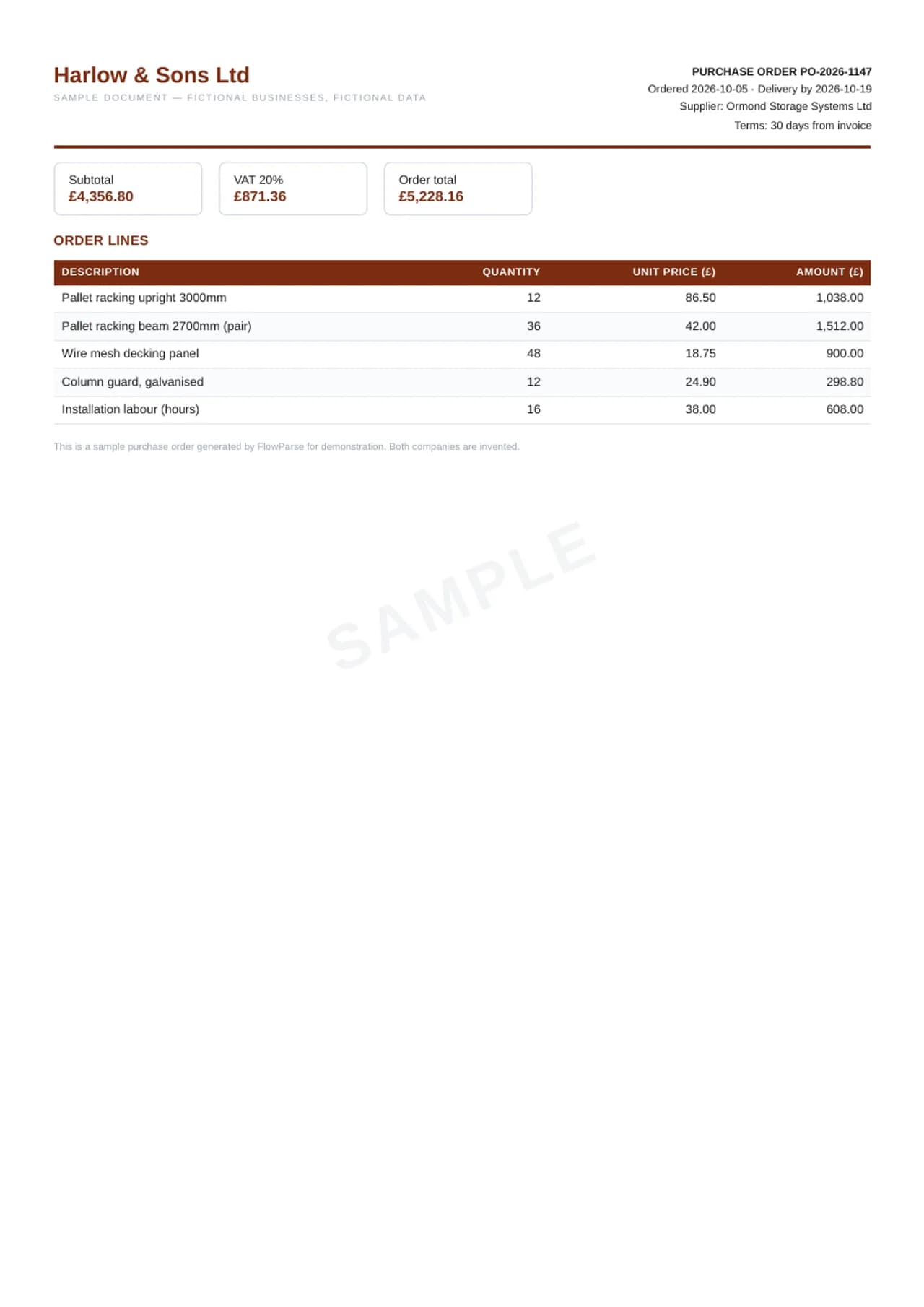
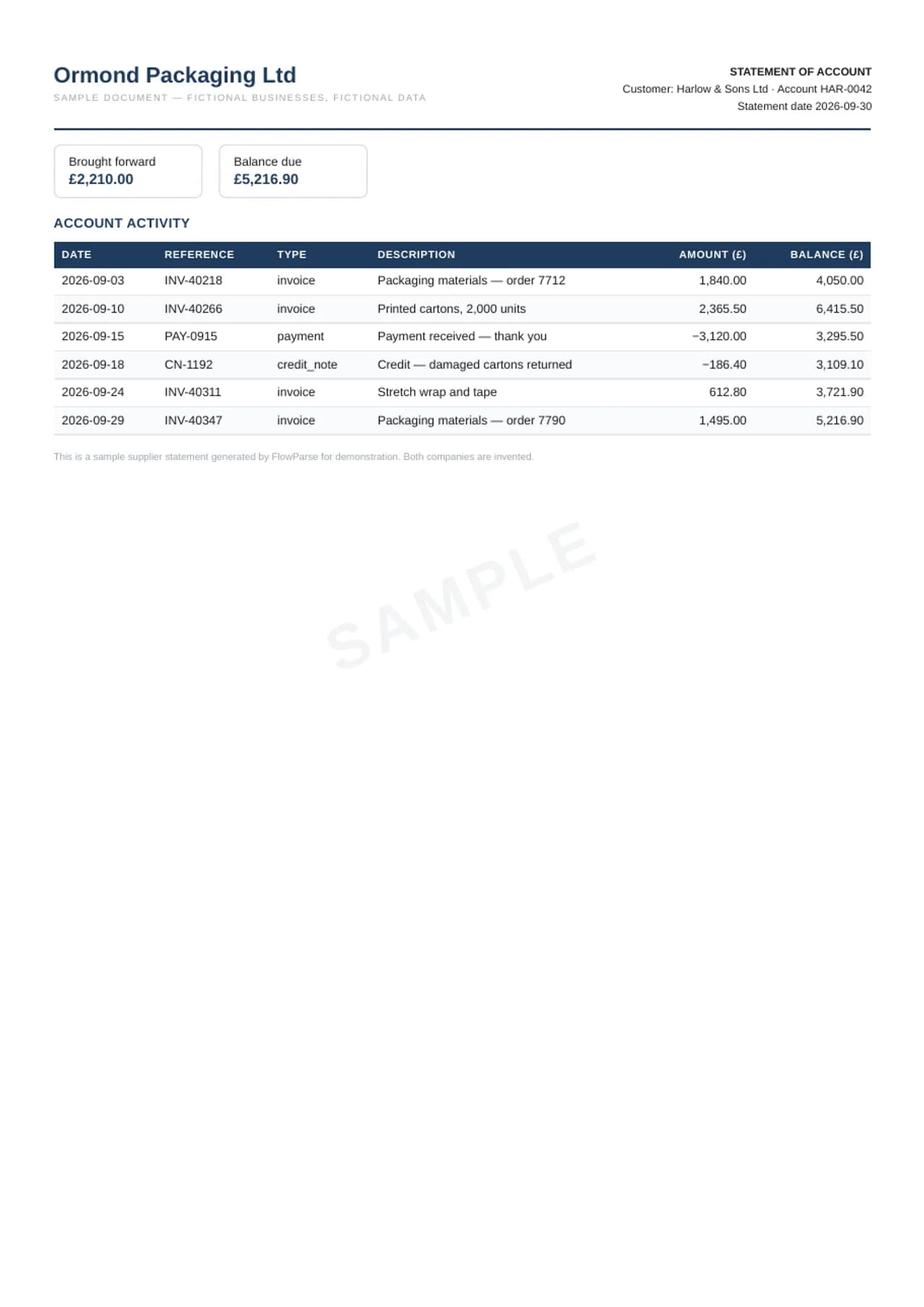
The purchasing side has its own arithmetic. The purchase order lists five lines of racking and labour; the PO gate checks quantity times unit price on every line, the lines against the subtotal, and subtotal plus 20% VAT against the order total of £5,228.16 — and the export keeps the order number, dates and terms as their own fields, so a PO can be matched to the invoice that follows it. The supplier statement is the document a vendor sends at month end: £2,210.00 brought forward, four invoices, a payment and a credit note, each with the running balance the supplier printed. The supplier-statement gate re-adds every one of those balances from the line before it and confirms the last equals the £5,216.90 balance due — a line that doesn't follow is named in the QA sheet. The purchase order also exports as a QuickBooks or Xero bill-import CSV. The supplier statement deliberately does not: it is a record of what you owe, not movements on a bank account, so it goes to Excel and CSV for matching against your purchase ledger.
Purchase order
Mortgage and loan statements
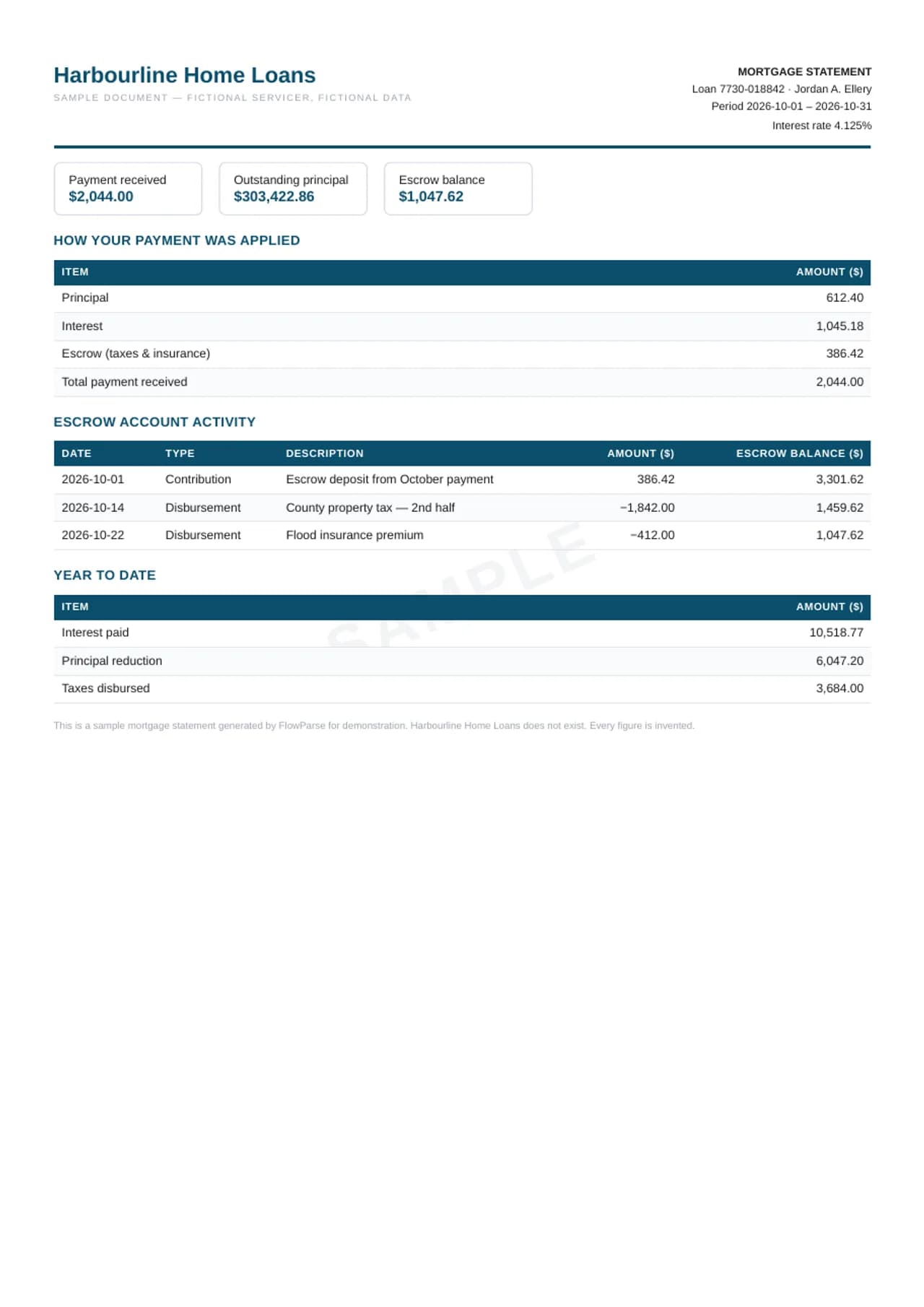
A monthly mortgage statement answers two questions, and the loan gate checks both. First, where did the payment go: $612.40 to principal, $1,045.18 to interest and $386.42 to escrow add up to the $2,044.00 received. Second, does the escrow account hold together: the October contribution and the two disbursements — the county's second-half property tax and a flood-insurance premium — move the escrow balance row by row to the $1,047.62 printed at the end. The workbook keeps the payment split, the escrow activity and the year-to-date interest (the figure a mortgage-interest deduction starts from) as separate, typed fields, and the CSV carries every one of them — on a scanned statement too.
Receipts
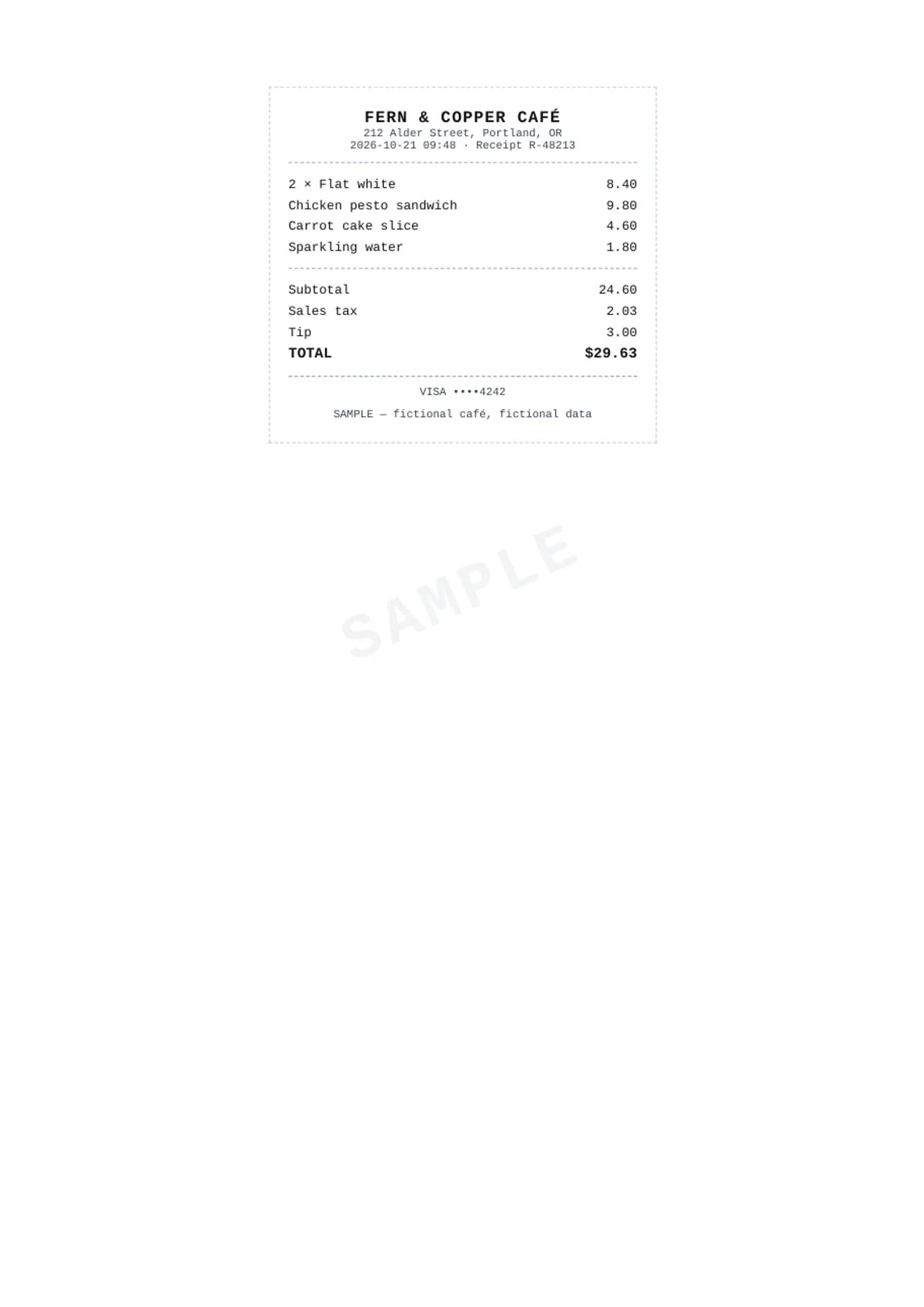
A till receipt is the smallest financial document and still has arithmetic to honour: line totals to the subtotal, subtotal plus tax plus tip to the amount charged. The sample is a café slip paid by card — two flat whites, a sandwich, cake and water, 24.60 before tax, 29.63 charged — converted to a workbook with the itemised lines and the totals separated into their own rows. That separation is the point: expense tracking needs the pre-tax figure, the tax and the tip as distinct numbers, not one blended total, and a receipt's narrow monospaced print is precisely the layout that defeats copy-paste. Receipts rarely travel alone, so the same engine batches a month of them into one register when needed.
Till receipt
Samples in other languages
Every language shows its own documents, on its own pages: a German Kontoauszug with Soll and Haben, a Spanish factura with retención, a French relevé, an Italian estratto conto, a Dutch afschrift and a Danish kontoudtog — each with exports whose labels stay in that language.
Deutsch
Español
Français
Italiano
Nederlands
How these samples are made
Each sample begins as a data fixture: a ledger whose running balances are computed, an invoice whose lines are built to sum, a payout report whose sections tie to the net. The fixture is rendered twice. Once into a PDF, through an HTML template styled after the region's conventions — a British statement's summary boxes, an Irish statement's IBAN and SEPA references, an American statement's MM/DD dates. And once through the product's export code into the output files. Because both renderings come from one fixture, you can pick any transaction in the PDF and find it, identical, in the spreadsheet — which is precisely the property a converter is supposed to guarantee.
The institutions are fictional on purpose. A statement that imitated a real bank's branding would be a forgery template, not a sample; a statement in a region's generic format with an invented bank name and a visible watermark is a demonstration. The converter itself is bank-agnostic — it reads the document in front of it and proves the reading against the document's own arithmetic, which is why a fictional bank's statement exercises exactly the same machinery as a real one's.
The library will keep growing along the same lines: more regional statement styles, more document types from the product's roster — brokerage and crypto statements, W-2s and 1099s, purchase orders, timesheets, loan statements — and more output dialects as pages warrant them. What will not change is the construction rule: fictional data, a watermark on every page, and outputs produced by the shipping export code rather than by hand. A sample that was tidied up in a spreadsheet editor would be advertising; a sample the product built is evidence.
If you want to see the engine on a real document — yours — the bank statement converter, invoice converter and receipt scanner all work the same way: upload, review the extraction with its checks, export. The free plan covers 10 pages a month. For folders of documents, Smart Merge consolidates up to 100 files into one workbook with a source-file column.
A short guide to the formats you are looking at
The tabs above each sample are not interchangeable flavours of the same file — each format answers a different question, and picking the right one saves an import headache later. This is what each one is for, using the samples on this page as the reference.
The Excel workbook: built for review, not just storage
Open any bank sample's Excel preview and the layout reads in a fixed order: an info block naming the bank, account holder, account number and period; summary tiles for the opening and closing balance; then the transaction table with the date, description, debit, credit and running balance columns tinted so money-out and money-in scan at a glance. The columns are real columns — dates are dates, amounts are numbers with currency formatting — so pivot tables, SUMIFS and filters work immediately, with no "convert text to number" step. Invoice workbooks follow the same idea with an invoice-shaped layout: header block, line-items table under your chosen columns, then the totals ladder, with withheld taxes, where an invoice has them, landing as their own negative row above the total due. Settlement workbooks mirror the report's own sections — Summary first, then one sheet per section, so fees never hide inside sales. Everything the product can verify is verified before this file is built, and what cannot be verified is labelled rather than invented.
QBO, QFX and OFX: the bank-feed trio
These three exist for one job: making accounting software treat a converted statement exactly like a feed downloaded from the bank. OFX is the open interchange format most tools accept; QBO is the QuickBooks Web Connect dialect of it, which QuickBooks Online accepts under Banking → Upload from file; QFX is the Quicken variant of the same family. Open the QBO tab on a bank sample and you can read the structure in plain text: an SGML header, the account block carrying the sample's account number and currency, then one STMTTRN per transaction with a signed amount, a date and a unique FITID. That FITID matters more than it looks — it is what lets the software recognise a transaction it has already imported, so re-uploading a file never duplicates a month of entries. Amounts are signed the banking way: money out negative, money in positive, and for a credit card statement the convention flips to what card accounts expect.
CSV: the format everything accepts
CSV is the lowest common denominator, and that is its virtue: ledgers, ERPs, banks' own import screens and ad-hoc scripts all read it. The samples' CSVs lead with the document's header fields — bank and account for a statement, supplier and totals for an invoice — followed by the flat table of rows. Because CSV carries no cell types, the discipline is in the writing: dates come out ISO, amounts keep their sign and decimal point, and text with commas is quoted properly. If an import wizard ever asks you to map columns, the headers here are the stable names to map once and reuse. For software with a dedicated import dialect — Xero, DATEV, Sage and a dozen others — the product writes that dialect directly, which is usually the better path than generic CSV.
What a sample can and cannot prove
An honest limit, stated plainly: these samples demonstrate the output side of the product — the workbook structure, the file formats, the validation discipline — on data we wrote to be clean. They cannot demonstrate extraction from your scan, because your scan's quality, your bank's layout quirks and your statement's edge cases are exactly the variables a fixture cannot fake honestly. That part you test in one step: upload a real document on the free plan, and judge the extraction by the same arithmetic you can check here — does the running balance reconcile, do the lines sum, is every failure named with its row. The free plan's 10 pages a month exist precisely so that the proof can be your own document rather than our sample.