
 Excel · CSV · QBO · Xero
Huntington Statement to Excel Converter
Huntington is direct about its limit: bank statements are available online for 24 months, and for anything older you have to contact the bank — which is why Huntington itself recommends printing or saving your statements. The same page recommends keeping them for at least seven years. Between a two-year window and a seven-year habit sits a stack of PDFs, and a PDF is not a spreadsheet.
Scanned or digital · multi-page · balance-validated · duplicates removed

From a Huntington PDF to a working spreadsheet
A fictional sample document converted by the same engine you get — flip through the source PDF and every export format, or download the files themselves.
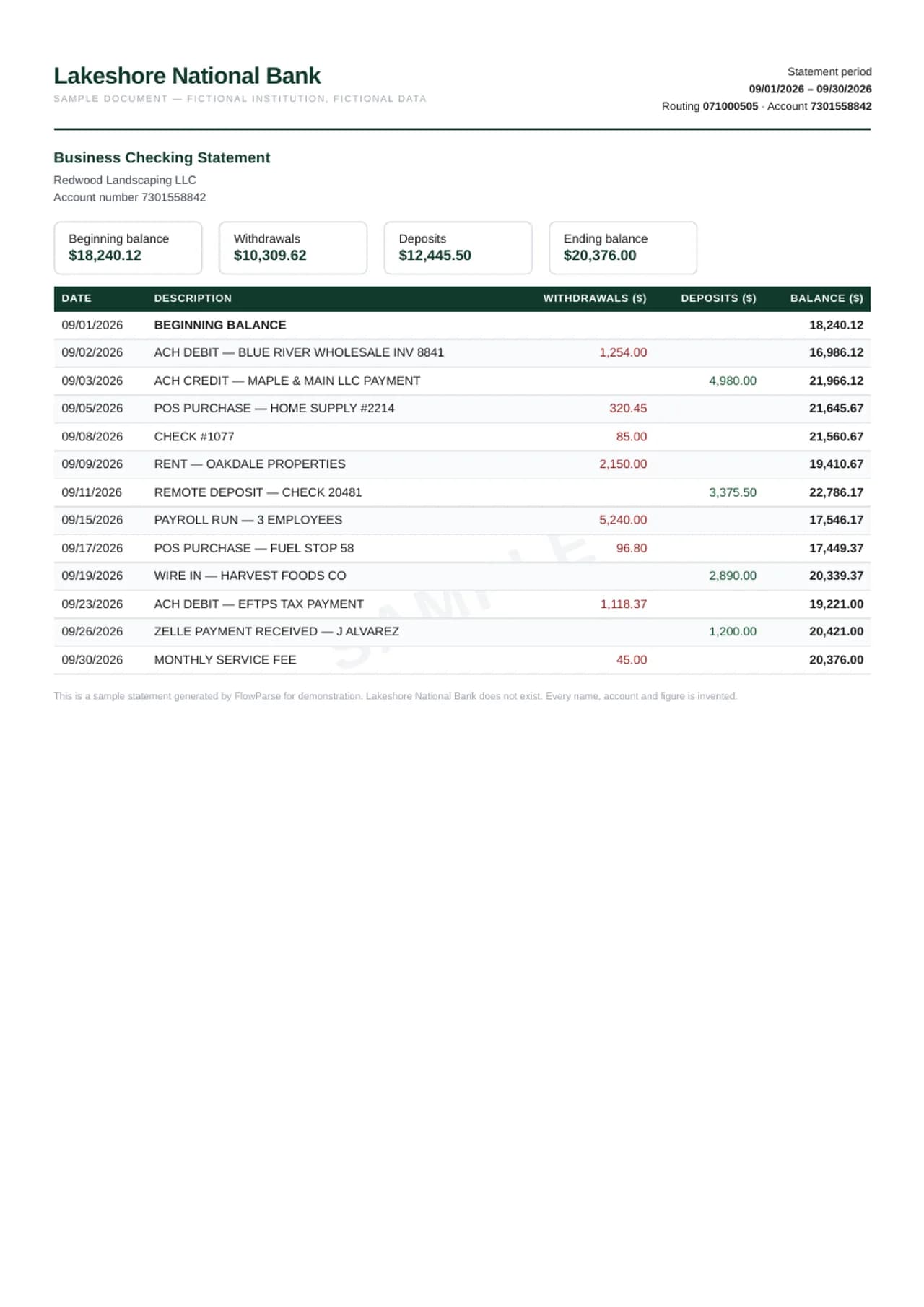
FlowParse turns a Huntington statement into rows: the date, the description, the check number where there is one, and the amount in dollars with its sign — withdrawals and checks negative, deposits positive. The opening balance plus every transaction is checked against the closing balance, and the result exports to Excel, CSV, a QBO file for QuickBooks, or a file for Xero or any other accounting software.
AI extraction, no templates
Reads this bank's layout with no per-bank setup.
Every column preserved
Date, description, amount, balance and every extra field, 1:1.
Balance-validated
Opening + transactions = closing, checked on every file.
Scanned & multi-page
OCR for image PDFs; long statements stitched into one list.
24 months in Online Banking
Huntington account holders see a statements tab in their Online Banking profile; Huntington says it shows two years of statements that can be viewed immediately. Older statement records have to be requested from Huntington directly.
A rolling two-year window means a statement from 25 months ago is already gone. If you need a full archive — for taxes, a business, a mortgage, a divorce — save each month as it arrives. A folder of saved PDFs is also the input FlowParse expects: upload them together and Smart Merge builds one table.
| Field | Captured in the export |
|---|---|
| Date | Transaction / posting date, normalised |
| Description | Payee, merchant or transfer detail, verbatim |
| Amount | Single signed value (debits −, credits +) |
| Balance | Running balance per transaction |
| Reference / type | Check number, transaction type, reference |
Seven years is Huntington's own advice
Huntington recommends keeping bank statements for at least seven years, because they are financial records used for taxes, and making back-up copies of electronic files. Set against a 24-month online window, that leaves at least five years you are expected to keep yourself.
Kept as PDFs, those five years are a record; converted, they are data. FlowParse turns every statement into rows and proves each one against its own balances, so the archive can be searched, filtered and totalled instead of opened one file at a time.
New to this? Read the guide on how to convert a bank statement PDF to Excel.
Going paperless first
Huntington notes that to see statements online, you switch to paperless statements; from then on, documents are available in the secure banking portal, with a notification when each is ready, usually monthly at the end of the statement period.
Paper statements from before the switch convert too. Scan them flat, one statement per file, and FlowParse reads them through OCR and proves them against their printed balances — then merges them with the electronic ones into one history.
Checks by number
Huntington points out that every check you wrote appears on the statement with its number and amount, and suggests double-checking that all checks are accounted for. For a business or a landlord, that is the reconciliation against the check register.
FlowParse keeps the check number in its own column. After conversion, a sort by number shows gaps — checks written but not yet cleared, or voided — and a lookup against the register matches each one.
The proof on every statement
The opening balance plus every signed transaction must equal the closing balance. FlowParse checks that on each statement, and checks rows against the running balance where it is printed. A deposit read as a withdrawal, or a transaction lost at a page break, fails at the row where it happened.
Statements that pass are marked reconciled; anything else is shown in the preview with the difference, before you download.
A tax year in one workbook
For a Schedule C, a rental Schedule E, a business return or a loan application, Smart Merge takes up to 100 Huntington PDFs — checking, savings, business accounts — and builds one workbook with every transaction in date order, the account and source file on every row, and a check that each closing balance is the next opening balance.
Statements from Chase, PNC, Fifth Third or KeyBank can be merged into the same workbook, column by column, for a business that banks in more than one place.
Huntington to QuickBooks or Xero
US bookkeepers and small businesses mostly work in QuickBooks Online, QuickBooks Desktop or Xero. FlowParse exports a QBO file QuickBooks imports as bank transactions, a CSV for Xero or any other software, and an Excel file for review first.
Because the full description and check number are kept, each line can be matched to a bill, an invoice or a check in the register after import.
Where hand-copied statements go wrong
Unsigned withdrawals, pasted next to deposits, turn the total into nonsense. A description that wraps — an ACH payment with a company ID, a card purchase with a location — becomes two rows. A check number pasted into the amount column becomes a payment that never happened.
FlowParse keeps one transaction per row with the right sign and the check number where it belongs; the balance proof confirms nothing was split, dropped or flipped.
Example: a small business rebuilds two years
A small landscaping company in Ohio switches bookkeepers. The new bookkeeper needs the last 24 months of the Huntington business checking account to rebuild the books. The figures here are an illustration, not a real company's.
The owner downloads the 24 statements before the oldest falls out of the online window and uploads them together. FlowParse returns one workbook in date order, each statement proved against its balances, the chain complete. The QBO file goes into QuickBooks; customer deposits, equipment payments, payroll ACH debits and checks to subcontractors — with their numbers — are categorized from the descriptions instead of retyped.
Before you use converted Huntington data
Coverage: every month for every account, each closing balance equal to the next opening balance. Checks: the check-number column matched against the register. Reconciled: every statement proved before its totals are used.
And keep the PDFs — Huntington's own recommendation is at least seven years, with back-ups. The converted file is a working copy.
Which Huntington documents convert
Checking, savings, money market and business account statements list transactions between two balances and convert the same way. Credit card statements convert as purchases and payments against the previous and new balance.
Tax forms, account letters and confirmations of a single transfer summarize or document one event. Keep them; convert the statements.
Older than 24 months
When you need statements past the online window — an audit, a legal matter, a lender looking further back — Huntington says to contact the bank directly. What comes back may be paper or PDF, and may cover several years at once.
Either way, upload what you receive alongside the statements you already have. Each one is proved against its own balances, and Smart Merge's chain check shows whether the requested period is now complete or whether one more request is needed.
Average daily balance, interest and fees
Huntington's explainer points out two figures on a statement that are not transactions. The average daily balance matters because some account types require a minimum average daily balance to avoid a Monthly Maintenance Fee. On an interest-bearing account, the statement shows the rate used to calculate the interest earned in the period, and some statements add a year-to-date total of interest.
FlowParse leaves those summary figures on the statement and converts the transactions, including the interest credit and any maintenance fee as their own rows. After merging a year, filter the descriptions for the fee and the interest: twelve months of maintenance fees in one column is often the moment a business decides to change account type, and the interest rows sum to the figure on the year-end tax form. Huntington also suggests verifying that your name, address and contact details at the top of each statement are accurate, and shredding paper statements when you dispose of them — the converted file holds the same personal data, so store it as carefully as the PDFs.
From PDF to clean data in three steps
1 · Upload the PDF
Drop one statement or many — digital or scanned, any number of pages.
2 · AI extracts & validates
Every transaction is read, amounts signed, balances checked, weak pages retried.
3 · Review & export
Check the editable preview, then download Excel, CSV, QBO, QFX, OFX or Xero.
For Huntington the PDF is usually a statement from the statements tab in Online Banking.
Convert to the format you need
The same extraction powers every export — convert once, then choose the output your next tool expects.
Huntington keeps 24 months of statements online and recommends keeping seven years; FlowParse turns the PDFs into rows.
| Format | Best for |
|---|---|
| Excel (.xlsx) | Analysis, totals, sharing |
| CSV | Importing into any tool |
| .QBO | QuickBooks Online & Desktop |
| .QFX | Quicken |
| .OFX | Most accounting tools |
| Xero CSV | Xero statement import |
Manual work vs FlowParse
Re-typing a statement by hand is slow and error-prone. FlowParse is near-instant, accurate, and scales to any volume.
By hand, a Huntington PDF loses its sign — deposits and withdrawals become one list of positive numbers.
| What happens | By hand | FlowParse |
|---|---|---|
| Reading the data | Copy-paste line by line | AI extracts every transaction |
| Scanned statements | Re-typed manually | OCR reads them automatically |
| Debits & credits | You fix every sign | Pre-signed, normalised |
| Balance check | Manual reconciliation | Validated automatically |
| Time per statement | 20–40 minutes | Under a minute |
| A full year | Hours per account | One Smart Merge upload |
A whole year into one reconciled Excel
Huntington's own explainer notes that some banks list deposits and deductions in separate sections while most list everything by date. Sectioned statements are where copying by hand goes wrong: a block of withdrawals pasted under a block of deposits, all as positive numbers, with the dates no longer in order.
FlowParse signs each amount from where it is printed — deposits positive, withdrawals and checks negative — and can sort the merged result back into date order. The balance proof then confirms that the signed rows lead from the opening balance to the closing balance.
Import straight into your accounting software
Need it in your books? FlowParse builds a real bank-feed file. The .QBO imports directly into QuickBooks with no CSV column mapping, each transaction carries a unique ID so re-imports never duplicate, and Quicken users get .QFX.
In the US that usually means QuickBooks Online, QuickBooks Desktop or Xero.
Validated, not just converted
Huntington describes a statement as covering a period, usually a month, with the processed deductions and deposits, the average daily balance and any interest earned — and not the current balance or pending transactions. Checks appear with their number and amount. An interest-bearing account shows the rate used and may show year-to-date interest.
FlowParse takes the transactions and the period's balances. Each transaction becomes a row with its date, description, check number and signed amount; the average daily balance and interest figures stay on the statement, where they belong.
More on the validation and reconciliation engines.
Your bank statements stay private
Bank statements are among the most sensitive documents you own. Converting one never puts it at risk.
Your Huntington PDF is deleted automatically 30 days after upload.
Encrypted transfer
Every upload and download runs over TLS.
Auto-deleted in 30 days
Your original PDF is removed automatically 30 days after upload.
EU servers
Stored on servers in the EU.
No AI training
Your documents are never used to train models. GDPR-aligned.
Read the full security overview.
Who converts these statements
Midwest small businesses and their bookkeepers, landlords, and households preparing a tax return or loan application.
Accountants
Bring client statements into Excel or QuickBooks without re-keying.
Bookkeepers
Catch up months of statements in minutes.
Small businesses
Get PDF-only statements into the books, ready for tax time.
Loan & mortgage applicants
Turn statements into a clean spreadsheet for underwriting.
Finance teams
Standardise statements from many banks into one format.
Anyone with a PDF statement
Skip the manual typing — convert and move on.
Explore the bank statement toolkit
For other US banks, see the Chase, PNC, Fifth Third and KeyBank converters.