
 Excel · CSV · QBO · Xero
Rabobank Statement to Excel Converter
Rabobank offers transaction downloads in three formats — CSV, MT940 and camt.053 — and its own advice is clear: CSV is the easy one to open in Excel, camt.053 is the one to import into bookkeeping software. Both cover the periods the download offers. The overzicht betaalrekening and the zakelijk rekeningafschrift, though, are PDFs, and so is every statement a client, tenant or applicant sends you.
Scanned or digital · multi-page · balance-validated · duplicates removed

From a Rabobank PDF to a working spreadsheet
A fictional sample document converted by the same engine you get — flip through the source PDF and every export format, or download the files themselves.
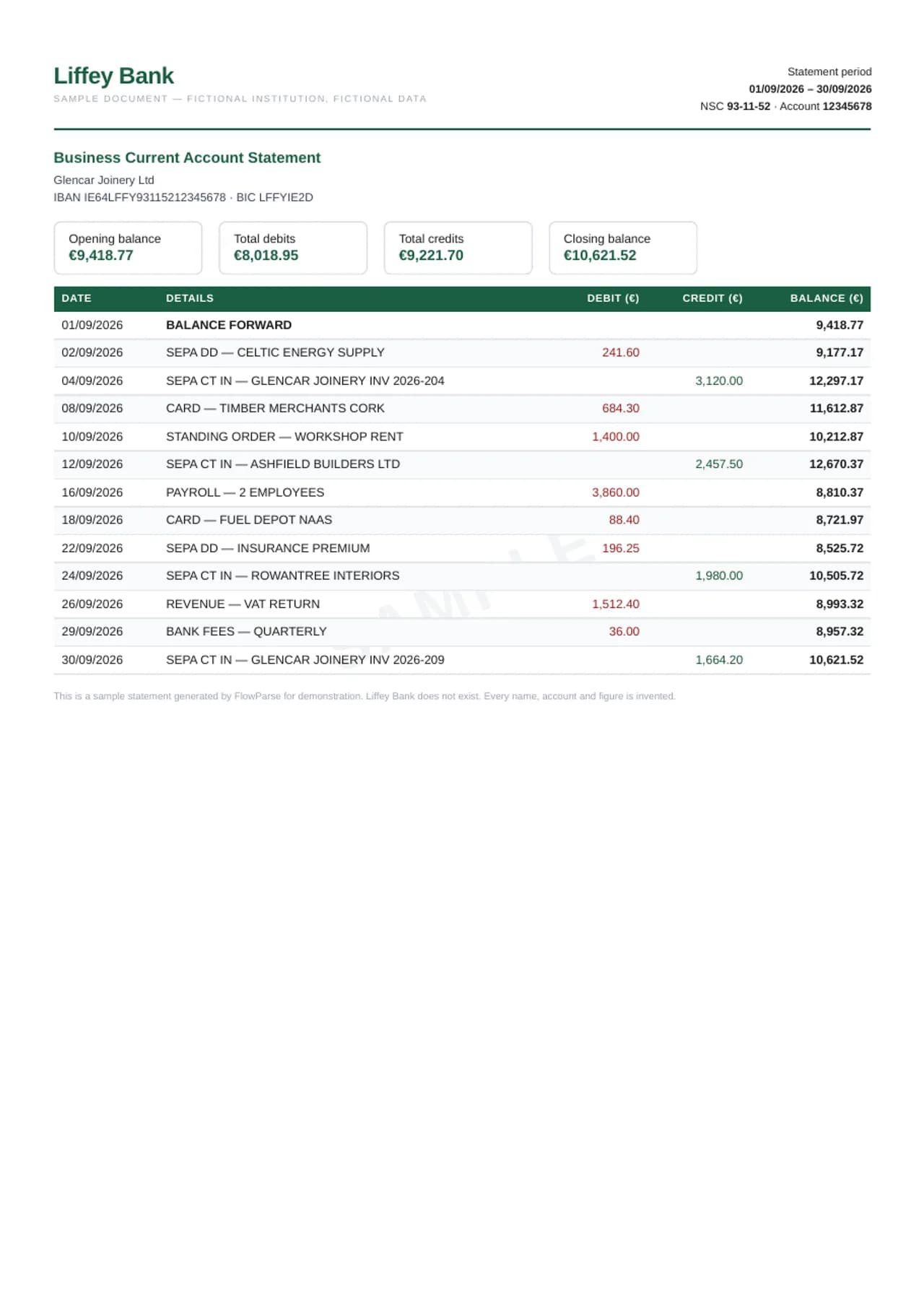
FlowParse turns a Rabobank PDF statement into the same rows a download would give: the date, the tegenrekening and its name, the omschrijving, the type of transaction and the amount in euros with its sign. The opening balance plus every transaction is checked against the closing balance on the statement, and the result exports to Excel, CSV, or a file for Exact, Twinfield, Moneybird, SnelStart or any bookkeeping program that imports one.
AI extraction, no templates
Reads this bank's layout with no per-bank setup.
Every column preserved
Date, description, amount, balance and every extra field, 1:1.
Balance-validated
Opening + transactions = closing, checked on every file.
Scanned & multi-page
OCR for image PDFs; long statements stitched into one list.
What FlowParse reads from a Rabobank statement
A Rabobank statement shows the account (IBAN), the period and the opening balance, then the transactions: the date, the counterparty's IBAN (tegenrekening) and name, the omschrijving the payer typed, a code for the kind of transaction — overboeking, incasso, betaalautomaat, iDEAL — and the amount marked as bij or af. Incasso lines add the incassant ID and machtigingskenmerk; iDEAL payments carry the webshop's name and order reference.
FlowParse keeps all of those as data. The tegenrekening and its name get their own place in the row, the omschrijving is kept whole even when it wraps, the transaction type is its own column for filtering, and bij and af become one signed amount in euros.
| Field | Captured in the export |
|---|---|
| Date | Transaction / posting date, normalised |
| Description | Payee, merchant or transfer detail, verbatim |
| Amount | Single signed value (debits −, credits +) |
| Balance | Running balance per transaction |
| Reference / type | Check number, transaction type, reference |
Rabobank's CSV, MT940 and camt.053 — and the PDF
In Rabo Online Bankieren you can download transactions as CSV, MT940 or camt.053. Rabobank describes CSV as a fairly simple format that is easy to open in Excel, and recommends camt.053 for importing into a bookkeeping package by hand, because camt.053 carries the bookings and the balance over closed book days. MT940 is the older SWIFT format; Rabobank's format pages discuss its phase-out, so check the current status there before building a new process on it.
What none of these formats covers is a statement you only have as a PDF: an overzicht betaalrekening, a zakelijk rekeningafschrift, a creditcard overview, or the statements a client hands their accountant. FlowParse gives those PDFs the same columns as the CSV.
New to this? Read the guide on how to convert a bank statement PDF to Excel.
Tegenrekening and omschrijving, kept apart
The most useful thing on a Dutch statement for bookkeeping is the tegenrekening: the counterparty's IBAN identifies the supplier or customer far more reliably than a name typed differently each time. Copied from a PDF by hand, the IBAN, the name and the omschrijving end up in one blob of text that has to be split again before anything can be matched.
FlowParse keeps the counterparty's IBAN and name in the description in a consistent order, so a filter on an IBAN finds every payment to that supplier across a year of statements, and a bookkeeping program's matching rules can recognise them.
Rabobank to Exact, Twinfield, Moneybird or SnelStart
Dutch boekhouders mostly work in Exact Online, Twinfield, Moneybird, SnelStart or e-Boekhouden. For periods Rabobank's download covers, its own camt.053 is the direct route. For PDF statements, FlowParse produces a CSV with date, omschrijving and signed amount for the bank import, and an Excel file for checking first.
Companies reporting to a foreign parent can take the same statement to QuickBooks (as a .QBO bank-feed file), Xero, DATEV or Sage.
Getting a clean Rabobank PDF before you convert
The cleanest input is the statement as Rabobank produces it in Rabo Online Bankieren — the overzicht betaalrekening or the zakelijk rekeningafschrift as a PDF. A downloaded PDF carries real text, so FlowParse reads every amount exactly as printed, with no OCR step in between. A scanned paper statement still works, but each scan is a chance for a digit to be misread.
Upload each statement as a whole file, so the beginsaldo on the first page and the eindsaldo on the last can prove everything in between. For several accounts or years, upload everything together: Smart Merge sorts by date, keeps accounts apart, and writes the source file on every row.
Common problems with Rabobank statements, and how they are handled
The tegenrekening, the name and the omschrijving are the first problem: copied by hand they become one long string, or split across rows, and the IBAN — the most reliable way to recognise a supplier — gets lost in the noise. FlowParse keeps them together in a consistent order in one cell per transaction.
Direction is the second. Bij and af are marked rather than printed with a minus sign, so a careless copy turns spending into income; FlowParse reads the marker. The third is mixing sources: a recent period from Rabobank's own CSV and an older one from PDF statements need to meet exactly. The balance check between consecutive statements in a merged workbook shows whether they do, and a missing month shows up as a break.
Worked example: a family farm's year for the boekhouder
A family farm banks with Rabobank: a business account for the farm, a savings account, and a private account. The boekhouder needs the business account's full year and finds part of it only as PDF statements. These figures are an illustration, not a real customer's.
The farm uploads the PDFs to FlowParse. Each statement is proved against its beginsaldo and eindsaldo, and Smart Merge joins them into one sheet with every transaction, the transaction type, and the tegenrekening in the description. The boekhouder filters by the IBANs of the feed supplier, the dairy buyer and the contractor to check the year's big flows, then imports the CSV into the bookkeeping program as a bank file. Where Rabobank's own camt.053 covers the latest months, those are imported directly, and the two parts meet on the saldo.
Checklist: Rabobank statements for the boekhouder or a lender
Before you send converted Rabobank statements on, check four things. Coverage: every account and month, with each eindsaldo matching the next beginsaldo; Smart Merge flags any gap. Sources: if recent months come from Rabobank's own CSV or camt.053 and older months from PDFs, check that the two meet on the saldo of the first overlapping day.
The reconciled mark: each statement in the export should be proved against its own beginsaldo and eindsaldo. And keep the originals: the PDF from Rabobank is the document of record for a lender or an audit, the converted file is the one you sort, filter and import. Sending both saves a round of questions.
Which Rabobank documents convert
The overzicht betaalrekening and the zakelijk rekeningafschrift are the main ones: transactions between a beginsaldo and an eindsaldo, which FlowParse turns into rows and proves. Savings statements share that shape and convert the same way, and so does a creditcard overview, which becomes its own list of purchases with the payment that settles it.
Year overviews (jaaroverzichten) summarise balances and interest for the tax return rather than listing movements; they are a check on the year's statements, not a replacement for them. Keep them alongside the export. For a farm or business with loans at Rabobank, loan statements list interest and repayments; those convert too, as their own sheet, so the repayment booked on the business account can be matched to the loan statement line.
If a business moves its day-to-day banking from Rabobank to another Dutch bank, or opens a second account at ABN AMRO or ING, convert the last statements of one and the first of the other together. Smart Merge shows both balances side by side, so the transfer between the accounts is booked once, not twice.
From PDF to clean data in three steps
1 · Upload the PDF
Drop one statement or many — digital or scanned, any number of pages.
2 · AI extracts & validates
Every transaction is read, amounts signed, balances checked, weak pages retried.
3 · Review & export
Check the editable preview, then download Excel, CSV, QBO, QFX, OFX or Xero.
For Rabobank the PDF is the overzicht betaalrekening, the zakelijk rekeningafschrift, or a statement a client sent you.
Convert to the format you need
The same extraction powers every export — convert once, then choose the output your next tool expects.
Rabobank's own downloads are CSV, MT940 and camt.053; these are the same formats for statements you only have as PDF.
| Format | Best for |
|---|---|
| Excel (.xlsx) | Analysis, totals, sharing |
| CSV | Importing into any tool |
| .QBO | QuickBooks Online & Desktop |
| .QFX | Quicken |
| .OFX | Most accounting tools |
| Xero CSV | Xero statement import |
Manual work vs FlowParse
Re-typing a statement by hand is slow and error-prone. FlowParse is near-instant, accurate, and scales to any volume.
By hand, a Rabobank line's tegenrekening, name and omschrijving paste as one blob that has to be split again.
| What happens | By hand | FlowParse |
|---|---|---|
| Reading the data | Copy-paste line by line | AI extracts every transaction |
| Scanned statements | Re-typed manually | OCR reads them automatically |
| Debits & credits | You fix every sign | Pre-signed, normalised |
| Balance check | Manual reconciliation | Validated automatically |
| Time per statement | 20–40 minutes | Under a minute |
| A full year | Hours per account | One Smart Merge upload |
A whole year into one reconciled Excel
A farm, a family business or a household with a betaalrekening, a spaarrekening and a zakelijke rekening at Rabobank quickly has dozens of PDFs per year. Smart Merge takes up to 100 of them and builds one workbook with every transaction in date order, the source file on every row, and a check that each statement's eindsaldo is the next one's beginsaldo per account.
Statements from ABN AMRO, ING, bunq or Knab merge into the same workbook, matched column by column.
Import straight into your accounting software
Need it in your books? FlowParse builds a real bank-feed file. The .QBO imports directly into QuickBooks with no CSV column mapping, each transaction carries a unique ID so re-imports never duplicate, and Quicken users get .QFX.
In the Netherlands that usually means Exact Online, Twinfield, Moneybird, SnelStart or e-Boekhouden.
Validated, not just converted
Every Rabobank statement prints a beginsaldo and an eindsaldo. FlowParse uses them as a proof: beginsaldo plus every bij minus every af has to equal the eindsaldo, to the cent. When the statement also prints a running balance, each row is checked against the previous one, pinning any misread amount to the exact transaction.
A statement that passes is marked reconciled. A statement that does not is shown with the gap and the surrounding rows, before you download.
More on the validation and reconciliation engines.
Your bank statements stay private
Bank statements are among the most sensitive documents you own. Converting one never puts it at risk.
Your Rabobank PDF is deleted automatically 30 days after upload.
Encrypted transfer
Every upload and download runs over TLS.
Auto-deleted in 30 days
Your original PDF is removed automatically 30 days after upload.
EU servers
Stored on servers in the EU.
No AI training
Your documents are never used to train models. GDPR-aligned.
Read the full security overview.
Who converts these statements
Boekhouders of farms and family businesses, lenders and landlords reading applicants' statements, and households collecting years of Rabobank PDFs.
Accountants
Bring client statements into Excel or QuickBooks without re-keying.
Bookkeepers
Catch up months of statements in minutes.
Small businesses
Get PDF-only statements into the books, ready for tax time.
Loan & mortgage applicants
Turn statements into a clean spreadsheet for underwriting.
Finance teams
Standardise statements from many banks into one format.
Anyone with a PDF statement
Skip the manual typing — convert and move on.
Explore the bank statement toolkit
For other Dutch banks, see the ABN AMRO, ING Netherlands, bunq and Knab converters.