
Free bank statement converter
Convert PDF bank statements to Excel or CSV for free — any bank, no signup to start. Balances are validated, duplicates removed, every column preserved. Free monthly pages, then one-off page packs from €5 that never expire — no subscription needed.
Any bank · scanned or digital · no watermark · full-quality output

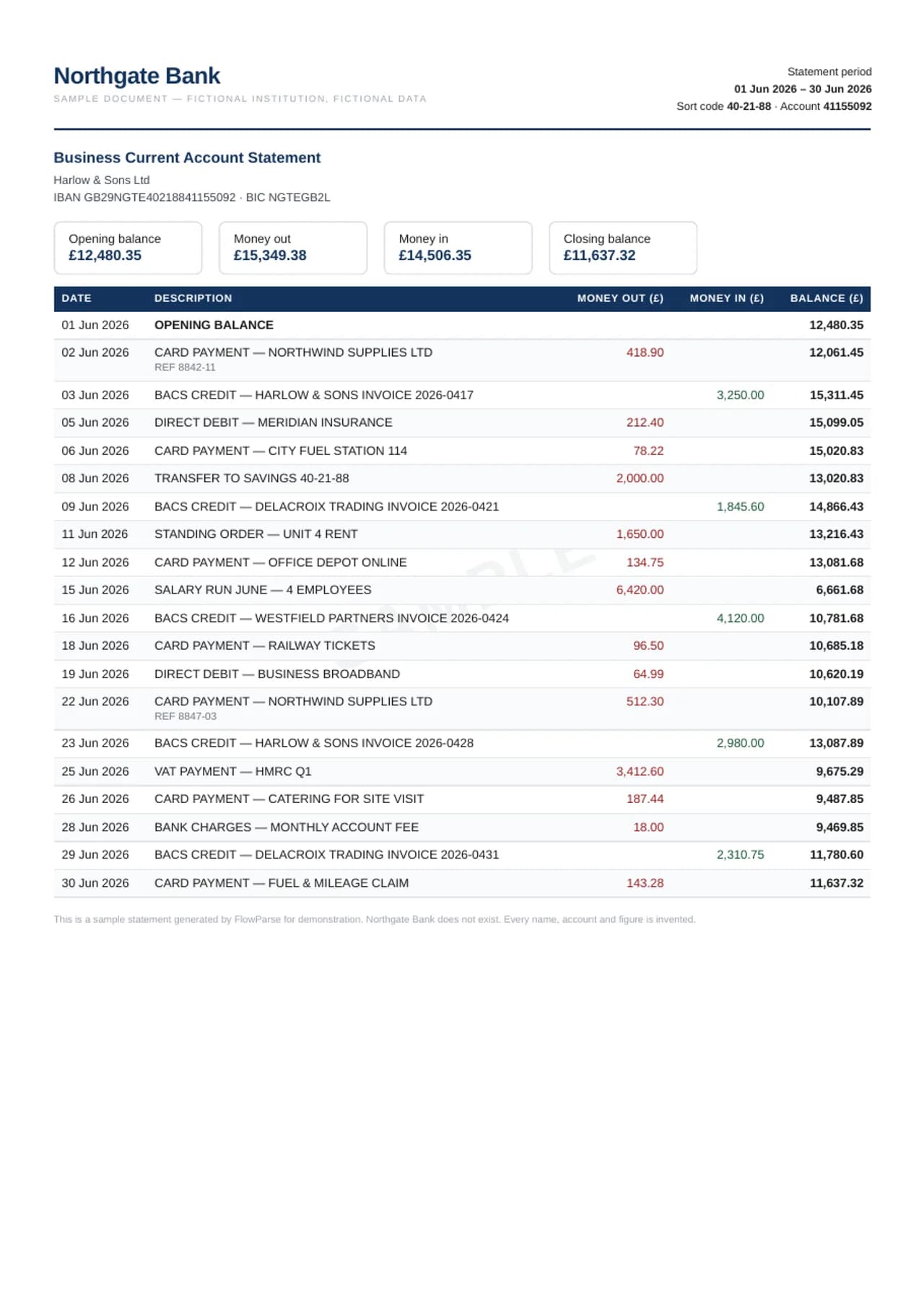
A real sample: bank statement (uk style) — to a working spreadsheet
A fictional sample document converted by the same engine you get — flip through the source PDF and every export format, or download the files themselves.
A genuinely free converter — no catch
Plenty of "free" converters give you a watermarked preview or a few rows and then ask for a card. FlowParse's free tier produces the same clean, complete spreadsheet as the paid plans — every transaction, every column, no watermark — within a free monthly page allowance you can use without signing up to start.
Full-quality output
Every column preserved, no watermark, no row limit per page.
Any bank, no templates
AI reads layouts it has never seen — US, UK, EU and neobanks.
Balance-validated
Opening + transactions = closing, checked on every file.
No subscription needed
10 free pages a month, then page packs from €5 that never expire.
Convert in three steps
1 · Upload the PDF
Drop your statement — digital or scanned, any bank. No signup to try.
2 · AI extracts & validates
Transactions read, amounts signed, balances checked.
3 · Download free
Export a clean Excel or CSV within your free pages.
Every format free — Excel, CSV and bank-feed files
| Format | Tier |
|---|---|
| Excel (.xlsx) | Free |
| CSV | Free |
| .QBO (QuickBooks) | Free |
| .QFX (Quicken) | Free |
| .OFX | Free |
| Xero CSV | Free |
| DATEV, Sage, 1C and others | Free |
Need QuickBooks? See the PDF to QBO converter. Need Xero? Bank statement to Xero.
Free vs paid — what changes
| Feature | Free | Paid plans & top-ups |
|---|---|---|
| Excel & CSV export | Yes | Yes |
| Any bank, full quality | Yes | Yes |
| Balance validation | Yes | Yes |
| QBO / QFX / OFX / Xero / DATEV | Yes | Yes |
| Pages per month | 10 | 300 to 25,000, or top up from 100 pages |
| Files per Smart Merge | Up to 5 | Up to 20 (Starter), 100 (Pro and above) |
Compare every tool on the best bank statement converters page, or consolidate a year with Smart Merge.
Your statement stays private — even free
Encrypted transfer
Every upload runs over TLS.
Auto-deleted in 30 days
The original PDF is removed automatically 30 days after upload.
EU servers
Stored on servers in the EU.
No AI training
Your documents are never used to train models.
What "free" means here, exactly
"Free" on a bank statement converter can mean many things: a free trial that ends, a free version that watermarks the output, or a converter that is free because it sells your data. Here is what it means on FlowParse, without small print.
You get 10 pages a month, every month, with no card and no trial period. A page is one page of a PDF: a three-page statement uses three pages. In an account, pages are charged only when a conversion succeeds, so a file that cannot be read costs nothing. The allowance renews each month.
Everything else is the same as on a paid plan. The same extraction reads the statement, the same balance check runs on it, and you can download it in every format: Excel, CSV, .QBO for QuickBooks, .QFX for Quicken, .OFX, and import files for Xero, DATEV, Sage and other accounting software. There is no watermark, no row limit and no column left out.
How far do 10 free pages go?
Statement length depends on the bank and on how busy the account is. These are typical ranges, as an illustration:
| What you convert | Typical pages | Fits in the free month? |
|---|---|---|
| One personal checking statement | 2–4 | Yes, with room to spare |
| One credit card statement | 2–6 | Yes |
| Three months for a rental or loan application | 6–12 | Often; otherwise spread over two months or top up |
| A busy business account, one month | 5–20 | Sometimes |
| A full year of statements | 24–60+ | No — a paid plan or a top-up |
The free allowance is meant for exactly what most people search "free bank statement converter" for: one statement now, a few next month — and a fair test of the quality on your own bank before you pay for volume.
A simple way to make the free pages last: convert each month's statement when it arrives instead of a whole year in April. One statement a month rarely runs past the allowance, the conversions stay current for budgeting or bookkeeping, and when tax time comes the year is already in your spreadsheets — checked, statement by statement, against the balances the bank printed. If a month turns out longer than usual, a small top-up covers it without changing anything else, and the unused top-up pages carry over to the next month. The monthly ten come back on their own; you do not need to log in or claim them, and there is nothing to cancel.
No signup to start — and what an account adds
You can upload a statement and download the result without creating an account. That is the quickest way to see whether the converter reads your bank properly. The free pages are counted per browser, so starting without an account does not give you a second allowance on top of an account's.
Creating a free account adds what a one-off visit cannot: a history of your conversions to download again, and the files you converted before signing in, which move into the account when you sign in from the same browser. It also gives you Smart Merge for up to five files at a time, to combine several statements into one workbook.
How to choose a free bank statement converter
Free converters differ far more in what they leave out than in how fast they are. Before you trust one with a statement that will end up in your books or a tax return, check these six things — on any tool, including this one:
- Does it check the totals? A converter that does not compare the transactions with the statement's own opening and closing balances cannot tell you when a row went missing.
- Is the output complete? Watch for watermarks, row caps, a missing balance column or descriptions cut short on the free tier.
- Are debits and credits signed correctly? Spot-check a few rows: a deposit shown as money out turns every total upside down.
- Does it read scans? Older statements and paper copies are images, not text. Many free tools return nothing for them.
- What happens to the file? Look for a clear statement of how long the PDF is kept and where it is processed.
- Can you get it into your software? Excel is a start; QuickBooks, Quicken and Xero want their own files.
For a side-by-side look at the tools people compare, see the best bank statement converters and best free bank statement converters in 2026.
Why a free conversion still gets the full balance check
Reading a PDF table is the easy part; knowing the result is complete is the hard part. A statement that spans several pages can lose a row at a page break, a scanned digit can be misread, and a bank that prints withdrawals and deposits in separate columns can be read with the wrong sign. None of that is visible in a spreadsheet that merely looks tidy.
So every statement — free or paid — is checked the same way: the opening balance plus every transaction must equal the closing balance printed by the bank, and where the bank prints a running balance, each row is checked against it. If the numbers do not meet, the preview tells you before you download, and you can correct the row in the editable preview. That is the difference between a converted file and a file you can rely on.
When you need more than 10 pages
There are two ways to go beyond the free month, and you do not need to commit to either before you have seen your own results. A top-up adds pages to your account without a subscription; top-up pages never expire and are used after your monthly pages run out. A plan gives you a larger monthly page budget and bigger Smart Merge batches.
| Option | Pages | Price |
|---|---|---|
| Free | 10 a month | €0 |
| Top-up | 100 / 500 / 2,000, never expire | €5 / €29 / €79 |
| Starter plan | 300 a month | €15 a month |
| Pro plan | 1,000 a month | €49 a month |
Larger plans and annual prices are on the pricing page. Whatever you choose, every export format stays included.
Convert a bank statement free, step by step
- 1. Get the PDF statement. In online banking, statements usually sit under a Statements or Documents section, one PDF per month. Download the statement itself rather than a filtered list of transactions — only the statement prints the opening and closing balances the check needs.
- 2. Open the converter and upload. Drag the PDF onto the bank statement to Excel converter. No account is needed for the first try. Scanned or photographed statements are fine.
- 3. Wait for the read and the check. The statement is read into rows — date, description, amount, balance and anything else the bank prints — and the totals are checked against the printed balances.
- 4. Look at the preview. The preview shows the rows and whether the statement balances. If a value needs correcting, edit it right there.
- 5. Download the format you need. Excel for reviewing, CSV for any spreadsheet or import, .QBO, .QFX or .OFX for QuickBooks and Quicken, or an import file for your accounting software. All of them are free.
Free converter, the bank's own export, or typing it in
If your bank offers a CSV download for the period you need, that is free too, and it is worth using. Here is how the three free routes compare when you need the data in a spreadsheet.
| Typing it in | Bank's CSV export | FlowParse free | |
|---|---|---|---|
| Works for old or closed accounts | Yes, slowly | Often not — recent periods only | Yes, from the PDF |
| Works for scans and paper statements | Yes, slowly | No | Yes, with OCR |
| Opening and closing balances | If you add them | Usually not included | Read from the statement and checked |
| Same layout for every bank | You decide | Different for every bank | Same columns every time |
| QuickBooks / Quicken file | No | Some banks | Yes, every bank |
| Time for a 3-page statement | 20–40 minutes | A few minutes | About a minute |
Which free download to choose
| Format | Choose it when |
|---|---|
| Excel (.xlsx) | You want to read, sort, filter or total the transactions, or send them to an accountant |
| CSV | You import into a spreadsheet, a budgeting app or software that asks for CSV |
| .QBO | You keep your books in QuickBooks Online or Desktop |
| .QFX | You use Quicken |
| .OFX | Your software imports Open Financial Exchange files (many do) |
| Xero, DATEV, Sage, 1C and others | You want an import file already laid out for that program |
More on each: PDF to QBO, PDF to QFX, bank statement to CSV, bank statement to Xero.
Scanned and photographed statements, free
Paper statements, faxed copies and phone photos are images: there is no text in them for a simple PDF tool to pull out, which is why many free converters return an empty sheet. FlowParse reads them with OCR first and then structures the rows the same way as a digital PDF — on the free allowance like any other page.
Scans get the same balance check as digital statements, which matters even more here: a misread 8 or 3 shows up as a statement that does not balance instead of a wrong figure nobody notices. For the best result, scan flat, one statement per file, with the whole page in view. More in scanned bank statement to Excel.
Example: three months for a rental application
A tenant applying for a flat is asked for three months of bank statements and proof that the rent is affordable. The figures here are an illustration. The three statements are three pages each — nine pages, inside the free month.
She sends the three PDFs to the letting agent as they are; they are the official documents. Then she converts them and downloads one Excel file per month. Sorting by amount shows the salary credits and the regular payments in seconds, so when the agent asks about income and existing commitments, she answers from one sheet instead of leafing through nine pages. Nothing was paid, and nothing was typed.
Any bank, any country, any language
The converter does not rely on a template per bank, so a statement from a large US bank, a German Sparkasse, a Spanish savings bank or an app-only bank is read the same way — on the free allowance like any other. Column names in other languages are recognised by meaning: Datum, Buchungstag and Fecha become the date, Soll and Haben become debit and credit, Saldo and Solde become the balance.
Number formats are read as written. A German or Italian statement that prints 1.250,00 gives you 1250.00 in the spreadsheet, not 1.25, and a minus sign or a separate debit column both come out as money leaving the account. The currency stays the currency of the statement; nothing is converted. Our bank-by-bank pages list what each bank offers for download and where to find its PDFs.
Credit card statements, free as well
A card statement is not shaped like a bank statement. Instead of an opening and closing balance it has a summary: previous balance, purchases, cash advances, fees, interest, payments and a new balance. The free conversion checks exactly that — previous balance plus purchases, cash advances, fees and interest, minus payments, must equal the new balance — and compares the listed transactions with the summary.
Each charge comes out as a row with its date, description, category where the issuer prints one, and amount. Download it as Excel or CSV for an expense report, or as a credit card .QBO for QuickBooks. Issuer-specific notes are on the credit card statement converter page.
Combine up to five statements free
With a free account, Smart Merge combines up to five statements into one workbook — a quarter of one account, or one month across several accounts. Each statement is checked against its own balances first; then the statements are put in date order, every row gets a Source File column, and the merge review warns you about anything that does not add up between files: the same transactions appearing in two files, or one statement's closing balance not matching the next one's opening balance, which usually means a month is missing.
The five files still count against your ten free pages, so a merge is most useful for short statements. For a full year in one go, see combine bank statements into one Excel.
Five mistakes that waste free pages
Converting a transaction list instead of the statement. A filtered list from online banking has no opening or closing balance, so nothing can prove it is complete. Download the monthly statement PDF.
Uploading the same file twice. Every upload is read again. Keep one folder per account and name files by month before you start.
Converting pages you do not need. Some banks append several pages of terms or marketing to the statement. If they carry no transactions and you have a PDF tool to hand, remove them first.
Photographing at an angle. A skewed, shadowed photo is harder to read. Lay the page flat in good light, or use a scanner app that straightens the page.
Downloading before looking at the preview. The preview tells you whether the statement balances. Fixing a row there is quicker than finding the error in your spreadsheet later.
What you pay for, if you ever pay
Bank statement converters charge in different ways: per document, per page, by monthly subscription, or by credits that expire. Some keep the useful parts — QuickBooks files, scanned statements, larger files — behind the paid tier, so the free version is a demo rather than a tool.
Here the line is drawn in one place only: volume. The quality, the checks and every export format are the same on the free allowance as on the largest plan. When you need more pages, you pay for pages — with a top-up that never expires or a monthly plan — and nothing else changes about how your statements are converted.
Questions people ask before converting their first statement
Is it all right to convert my own bank statement?
Yes. The statement is your document, and turning it into a spreadsheet is no different from typing it into one. Your bank is not involved and is not notified. If you convert statements for someone else — a client, a family member — do it with their permission, as you would with any of their financial records.
Does converting change the PDF?
No. The converter reads the PDF and produces a new file; the statement itself is untouched. Keep the original — it is the official record a lender, landlord, auditor or tax authority will ask for. The spreadsheet is your working copy.
What if my statement is very long?
There is no limit on pages per document — a forty-page business statement converts as one file. It simply uses forty pages of allowance, so a long statement is a good moment for a top-up rather than spreading it over months.
Can I trust a converted statement for my taxes?
Trust the check, not the look of the spreadsheet. A converted statement whose transactions add up from the printed opening balance to the printed closing balance has nothing missing and nothing extra. That is what the free conversion tells you for every statement — and if it does not add up, you see where before you file anything. Our guide on preparing bank statements for taxes covers the rest of the process.
Do I need to install anything?
No. You use it on the website, from a computer or a phone. There is no desktop program to download, no add-in for Excel and no browser extension.
What people convert for free
Budgeting. One month of a checking account in Excel, sorted by amount, shows where the money goes faster than any banking app. Our guide to categorising bank transactions shows how to group the rows.
Applications. Landlords and lenders ask for recent statements. Send the PDFs; convert them to answer the follow-up questions about income and regular payments from one sheet.
Small-business bookkeeping. A sole trader with a quiet account can often convert a month or two within the free pages and import them straight into QuickBooks, Xero or Quicken with the matching file.
Testing before buying. Accountants and bookkeepers convert one client statement from each bank they deal with to see the quality for themselves — the converter for accountants covers what changes at volume.