
 Excel · CSV · QBO · Xero
Bank of Ireland Statement to Excel Converter
Bank of Ireland keeps eStatements visible for seven years on open accounts, in 365 online and the Bank of Ireland App — current accounts, credit cards, demand deposit and loan accounts — free, as PDFs. Its transaction search reaches back twelve months. So for anything older than a year, or anything a lender, Revenue or a solicitor needs as a document, the eStatement is the source.
Scanned or digital · multi-page · balance-validated · duplicates removed

From a Bank of Ireland PDF to a working spreadsheet
A fictional sample document converted by the same engine you get — flip through the source PDF and every export format, or download the files themselves.
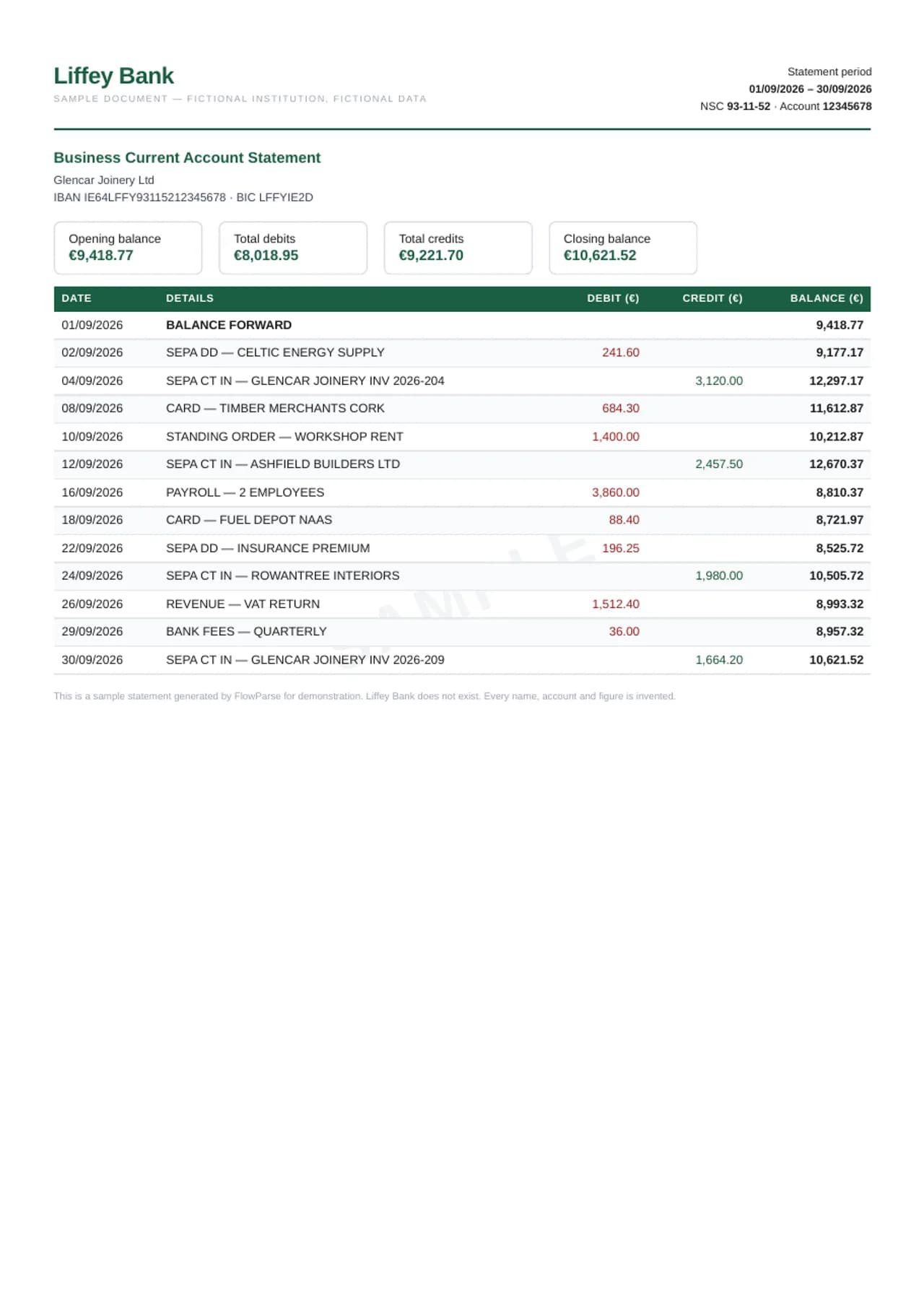
FlowParse turns a Bank of Ireland eStatement into rows: the date, the details with the payee, direct debit originator or transfer reference, and the amount in euros with its sign — debits negative, credits positive, decided by the column. The opening balance plus every transaction is checked against the closing balance, and the result exports to Excel, CSV, or a file for Xero, Sage, QuickBooks or any other accounting software.
AI extraction, no templates
Reads this bank's layout with no per-bank setup.
Every column preserved
Date, description, amount, balance and every extra field, 1:1.
Balance-validated
Opening + transactions = closing, checked on every file.
Scanned & multi-page
OCR for image PDFs; long statements stitched into one list.
Seven years — and after closing, duplicates
Bank of Ireland's help centre states it directly: eStatements remain visible online for seven years for open accounts. After you close an account, its statements remain available for seven years as duplicate statements you can order.
So a closed account's history is still recoverable, but by request rather than download. Saving the PDFs before you close the account is quicker — and those saved PDFs are exactly what FlowParse converts.
| Field | Captured in the export |
|---|---|
| Date | Transaction / posting date, normalised |
| Description | Payee, merchant or transfer detail, verbatim |
| Amount | Single signed value (debits −, credits +) |
| Balance | Running balance per transaction |
| Reference / type | Check number, transaction type, reference |
Where to find eStatements
In the Bank of Ireland App or 365 online, select an account to open its transactions screen, choose Statements, and open or save the statement you need. If the app gives trouble, Bank of Ireland suggests logging in to 365 online in a browser instead.
Download a year at a time into a folder per account. Upload the folder and Smart Merge puts the statements in order, checking that each closing balance runs into the next opening balance.
New to this? Read the guide on how to convert a bank statement PDF to Excel.
Monthly, quarterly or yearly
Bank of Ireland issues eStatements at the same frequency as paper statements — monthly, quarterly or yearly, depending on the account. Credit card statements are monthly.
A quarterly or yearly statement simply covers a longer period between two balances. FlowParse proves it the same way, and once merged, the table can be filtered to any month, quarter or tax year regardless of how the statements were cut.
What FlowParse reads from a BOI statement
A Bank of Ireland statement gives the account name, the NSC and account number or IBAN, the statement date and the opening balance, then the transactions — a direct debit with the originator, a standing order, a SEPA credit transfer, a card payment, an ATM withdrawal, a fee — each with a debit or credit amount and the balance. The closing balance ends it.
FlowParse writes one row per transaction with the date, the full details and one signed amount in EUR, decided by the column, so the amount column sums to the change in balance.
Checked against the closing balance
The opening balance plus every signed transaction must equal the closing balance. FlowParse checks that on every Bank of Ireland statement, and checks each row against the running balance where it is printed. A credit read as a debit, or a line lost at a page break, fails at the row where it happened.
Statements that pass are marked reconciled; anything else is shown in the preview with the difference and the rows around it.
Loans and demand deposit accounts
Bank of Ireland lists loan and term loan accounts, and demand deposit accounts, among those with eStatements — with a footnote that some of them can only be registered and viewed in 365 online, not the tablet app. A loan statement shows repayments and interest between two balances; a deposit statement shows lodgements, withdrawals and interest.
Both convert. Merged with the current account, the loan repayments appear on both sides, and the interest rows sum to the year's cost of borrowing or return on savings.
A tax year in one workbook
For a Form 11 return, a landlord's rental accounts, a sole trader's year end or a probate, Smart Merge takes up to 100 Bank of Ireland PDFs — current, savings, credit card, loan — and builds one workbook with every transaction in date order, the account and source on every row, and a check that each closing balance is the next opening balance.
Statements from AIB or PTSB can be merged into the same workbook, matched column by column.
Bank of Ireland to Xero, Sage or QuickBooks
Irish accountants and small businesses commonly work in Xero, Sage, QuickBooks or Surf Accounts. FlowParse exports a CSV with date, details and signed amount for a bank import, a QBO file for QuickBooks, and an Excel file for review first.
Because the details are kept whole — the direct debit originator, the SEPA reference — each line can be matched to an invoice or receipt after import.
Where hand-copied statements go wrong
Debits and credits are unsigned columns; pasted into one list, they all become positive. An Irish date like 03/04/2025 is the 3rd of April, and an American-default spreadsheet makes it March 4th. A SEPA transfer with a long reference wraps over two lines and becomes two rows.
FlowParse signs by column, writes unambiguous dates and keeps one transaction per row; the balance proof confirms nothing was split or dropped.
Example: a mortgage application
A couple applying for a mortgage are asked for six months of current account statements and three months of credit card statements, with the most recent no older than a few weeks. The figures here are an illustration, not a real couple's.
They download the monthly eStatements, order an up-to-date statement before 3:30pm, and upload everything the next morning. FlowParse returns one workbook, each statement proved, the accounts chained to yesterday. Their broker filters salary credits, rent and existing loan repayments in minutes; the PDFs go to the lender unchanged.
Before you rely on converted BOI statements
Coverage: each closing balance equal to the next opening balance, per account — quarterly and yearly statements included. Closed accounts: PDFs saved before closing, or duplicates ordered. Reconciled: every statement proved before its totals are used.
And keep the PDFs. The converted file is a working copy; the eStatement is the record for Revenue, a lender or a solicitor.
Which Bank of Ireland documents convert
Current account, demand deposit, loan and credit card eStatements list transactions between two balances and convert the same way. Up-to-date statements ordered online convert too.
Interest certificates, fee notices and letters are single figures or notices. Keep them with the file; convert the statements.
No charge, and paper whenever you want
Bank of Ireland says there is no extra charge for eStatements and that you can switch back to paper whenever you like. It sends an email or text when a new document is ready, and keeps eStatements securely for seven years.
Use the notice as a reminder to save the PDF into your own folder. Seven years in 365 online is generous; a folder of your own is permanent, survives an account closure, and is ready to convert in one upload at year end.
Probate and an executor's first weeks
An executor settling an estate needs to see what came in and went out of the deceased's accounts: pensions, direct debits still running, transfers in the final months. Bank of Ireland statements — downloaded, or ordered as duplicates for up to seven years after closing — tell that story, but slowly, page by page.
Converted and merged, they become one sheet in date order, each statement proved. Filtering by originator lists the direct debits to cancel; sorting by amount shows the large payments the solicitor will ask about.
From PDF to clean data in three steps
1 · Upload the PDF
Drop one statement or many — digital or scanned, any number of pages.
2 · AI extracts & validates
Every transaction is read, amounts signed, balances checked, weak pages retried.
3 · Review & export
Check the editable preview, then download Excel, CSV, QBO, QFX, OFX or Xero.
For Bank of Ireland the PDF is usually an eStatement from the account's Statements screen in 365 online or the Bank of Ireland App.
Convert to the format you need
The same extraction powers every export — convert once, then choose the output your next tool expects.
Bank of Ireland keeps seven years of eStatements; FlowParse turns the PDFs into rows.
| Format | Best for |
|---|---|
| Excel (.xlsx) | Analysis, totals, sharing |
| CSV | Importing into any tool |
| .QBO | QuickBooks Online & Desktop |
| .QFX | Quicken |
| .OFX | Most accounting tools |
| Xero CSV | Xero statement import |
Manual work vs FlowParse
Re-typing a statement by hand is slow and error-prone. FlowParse is near-instant, accurate, and scales to any volume.
By hand, a Bank of Ireland PDF loses its sign — debits and credits become one list of positive numbers.
| What happens | By hand | FlowParse |
|---|---|---|
| Reading the data | Copy-paste line by line | AI extracts every transaction |
| Scanned statements | Re-typed manually | OCR reads them automatically |
| Debits & credits | You fix every sign | Pre-signed, normalised |
| Balance check | Manual reconciliation | Validated automatically |
| Time per statement | 20–40 minutes | Under a minute |
| A full year | Hours per account | One Smart Merge upload |
A whole year into one reconciled Excel
Bank of Ireland's 365 online lets you export recent transaction history and search up to twelve months of account transactions; credit card transactions and statements are shown for the past 13 months.
Inside those windows, the export may be enough. Beyond them — year two to seven, or a card statement from two years ago — the eStatement PDF is what's left, and FlowParse converts it with a proof the export doesn't carry: every statement checked against its own balances.
Import straight into your accounting software
Need it in your books? FlowParse builds a real bank-feed file. The .QBO imports directly into QuickBooks with no CSV column mapping, each transaction carries a unique ID so re-imports never duplicate, and Quicken users get .QFX.
In Ireland that usually means Xero, Sage, QuickBooks or Surf Accounts.
Validated, not just converted
When you need a statement now — for a mortgage application or a landlord — Bank of Ireland lets you order an up-to-date statement under Services, Manage statements. Ordered before 3:30pm on a working day, it is produced overnight and ready to download; paper copies take three to five working days if you've opted in. It works for current, demand deposit and instant access accounts; for credit cards, only copies of existing statements.
The overnight statement is a PDF like any other. Converted, it gives the lender's checklist — salary, rent, loan repayments — in a sheet the next morning.
More on the validation and reconciliation engines.
Your bank statements stay private
Bank statements are among the most sensitive documents you own. Converting one never puts it at risk.
Your Bank of Ireland PDF is deleted automatically 30 days after upload.
Encrypted transfer
Every upload and download runs over TLS.
Auto-deleted in 30 days
Your original PDF is removed automatically 30 days after upload.
EU servers
Stored on servers in the EU.
No AI training
Your documents are never used to train models. GDPR-aligned.
Read the full security overview.
Who converts these statements
Irish accountants, landlords, mortgage applicants and executors.
Accountants
Bring client statements into Excel or QuickBooks without re-keying.
Bookkeepers
Catch up months of statements in minutes.
Small businesses
Get PDF-only statements into the books, ready for tax time.
Loan & mortgage applicants
Turn statements into a clean spreadsheet for underwriting.
Finance teams
Standardise statements from many banks into one format.
Anyone with a PDF statement
Skip the manual typing — convert and move on.
Explore the bank statement toolkit
For other Irish banks, see the AIB and PTSB converters.