
 Excel · CSV · QBO · Xero
Citi Credit Card Statement to Excel Converter
Citi's guide to previous statements has two parts. Recent statements — those issued after your card was registered for Citi Online — download straight away from the Statements (PDF) link. Anything older goes through Older Statements: pick the year and month, request it, wait 48 to 72 hours, and download it from the request status list. Then the clock starts again: requested older statements are available for only seven days.
Scanned or digital · multi-page · balance-validated · duplicates removed

From a Citi credit card PDF to a working spreadsheet
A fictional sample document converted by the same engine you get — flip through the source PDF and every export format, or download the files themselves.
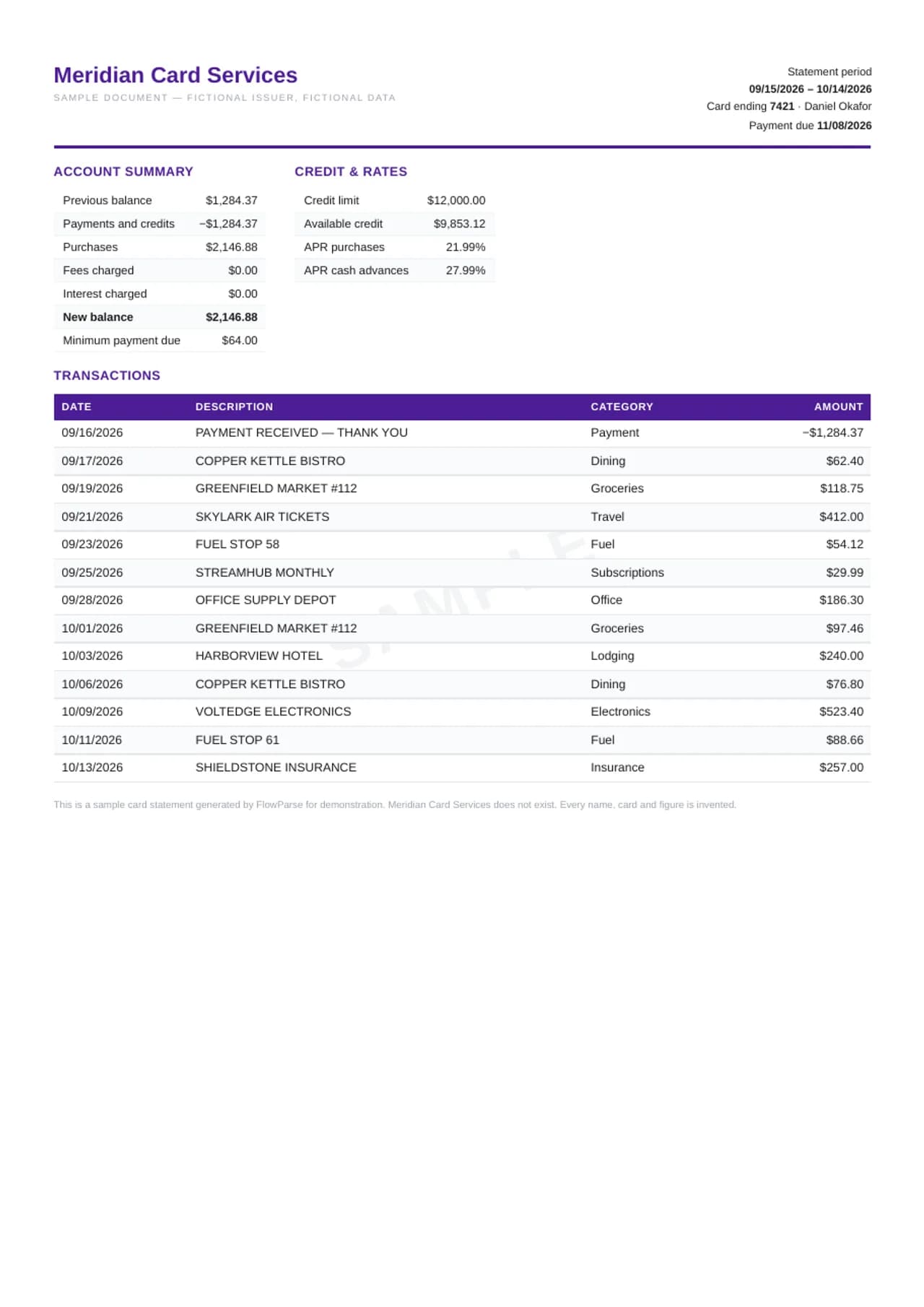
FlowParse turns those PDFs into rows: the date, the merchant, and the amount in dollars, with purchases and payments carrying opposite signs. Each statement is checked against its own account summary — the balance carried in, plus purchases, cash advances, fees and interest, less payments and credits, must equal the new balance — and the result exports to Excel, CSV, a QBO file for QuickBooks, or a file for Xero.
AI extraction, no templates
Reads this bank's layout with no per-bank setup.
Every column preserved
Date, description, amount, balance and every extra field, 1:1.
Balance-validated
Opening + transactions = closing, checked on every file.
Scanned & multi-page
OCR for image PDFs; long statements stitched into one list.
Recent statements start at registration
Citi notes that only statements issued after your card was registered for Citi Online are immediately available under Recent Statements. If you registered late — or a family member's card was added recently — the early months won't be there.
That gap is invisible until you need it. Check the first statement in the list against the card's opening date before you rely on the online archive.
| Field | Captured in the export |
|---|---|
| Date | Transaction / posting date, normalised |
| Description | Payee, merchant or transfer detail, verbatim |
| Amount | Single signed value (debits −, credits +) |
| Balance | Running balance per transaction |
| Reference / type | Check number, transaction type, reference |
Older Statements: 48 to 72 hours
For anything outside Recent Statements, Citi's process is a request: under Older Statements, select the year and month from the drop-down boxes and click Request. The request shows as Processing Request, and Citi says it may take 48 to 72 hours to fulfil; you can make another request for further months.
Ask for every month you need at once. Three days later they arrive together, ready to convert in one upload.
New to this? Read the guide on how to convert a bank statement PDF to Excel.
Seven days to download
When a request is ready, Citi marks it Ready for Download under Older Statement Request Status — and warns that requested older statements are available for only seven days, asking you to print or save them.
Miss the window and you request again. Save each PDF the day it appears, in a folder named by year and month, and that folder becomes the permanent archive FlowParse converts.
From Citi PDF to rows
Every purchase, payment, credit, fee and interest charge on the statement becomes a row with its date, the merchant or description as Citi printed it, and one signed amount. Purchases and payments point in opposite directions, so the column sums to the change in what you owe.
Reference numbers and merchant locations that Citi prints stay in the description, so matching to receipts still works after import.
Rewards cards and Costco
Citi issues co-branded cards — Costco Anywhere Visa among them — alongside its own cash-back and travel cards. The statements share a structure: a summary, transactions, interest and fee details.
Whichever Citi card you hold, the conversion works the same; cash-back credits that the statement lists as credits stay credits in the spreadsheet.
Interest and fees, isolated
Interest charges and fees are easy to overlook among dozens of purchases. Over a year they can add up to more than people expect.
Converted and merged, a year of Citi statements lets you filter interest and fee lines in one step and see exactly what carrying a balance cost — the number that decides whether a balance transfer is worth it.
Business expenses on a personal Citi card
Many freelancers put business costs on a personal Citi card. At tax time they need those charges separated and totalled.
Converted, the statement becomes a list you can tag: business or personal, by category. Export only the business rows as a QBO or CSV file for the books; the rest stays out.
A year in one workbook
Smart Merge takes up to 100 statement PDFs and lays them out in date order. It checks the chain: each statement's new balance must be the next statement's previous balance.
With Citi's request-and-wait process, gaps are common. The chain breaks exactly where a month is missing, so you know which Older Statements request to make.
Example: a freelancer's tax year
A photographer in Denver uses a Citi card for gear, travel and software, mixed with personal spending. His tax preparer needs the year's business expenses. The figures here are an illustration.
He requests the older statements, downloads them within the seven-day window, adds the recent ones and uploads all twelve. FlowParse returns one checked workbook; he tags the business lines, and the preparer receives a CSV.
Before you rely on converted Citi statements
Check coverage: every month present, each new balance carrying into the next previous balance. Check the request status: every older statement downloaded within its seven days. Check the summaries: every statement reconciled before its totals are used.
Keep the PDFs. The spreadsheet is a working copy.
Records for the IRS
The IRS generally asks you to keep the records behind a tax return for three years after filing, longer in some cases. Citi statements that support deductions belong in that file.
Because older statements must be requested and expire after seven days, the reliable archive is your own folder of PDFs — converted whenever an accountant or the IRS asks.
Payments from the bank account
The monthly Citi payment leaves your checking account and arrives on the card. Upload the bank statements and the Citi statements together and both sides line up by date.
The payment pairs and can be excluded, leaving real spending — the view a budget or a loan application needs.
Scanned paper statements
Paper statements from before you went paperless can be scanned flat, one per file. FlowParse reads them through OCR and checks each against its printed summary.
If a digit was misread, the summary won't close — which is exactly how you know.
Disputes and credits
A disputed purchase and the credit that resolves it can appear on different statements. In separate PDFs they are hard to pair.
Merged, a search for the merchant shows both lines together, so you can confirm the credit and book it against the original expense.
Into QuickBooks or Xero
The QBO file imports into QuickBooks as credit card transactions with the merchant on each line. The CSV carries the same columns for Xero or a spreadsheet.
Each statement was checked against Citi's own summary first, so a difference in your credit card reconciliation points at the bookkeeping, not the conversion.
Plan the request around a deadline
Citi's three-step rhythm — request, wait 48 to 72 hours, download within seven days — means older statements take planning. If a lender needs twelve months by Friday, request them on Monday.
List every month you need, request them in one sitting, and set a reminder for three days later. When they show Ready for Download, save all of them the same day and upload them together; the chain check confirms the year is complete before you send anything.
A statement archive you control
Recent statements are immediate, older ones are a request away and then expire again after seven days. Every time you need the same old month, you start over.
A folder of saved PDFs ends that loop. Name each file by year and month, keep the converted workbook beside them, and the next request for an old Citi statement takes seconds instead of three days.
Balance transfers and promotional rates
Citi cards are often used for balance transfers with a promotional rate. The statement shows the transferred balance, any transfer fee, and — once the promotion ends — the interest that starts to accrue.
Converted across the promotional period, those lines sit in one column, so you can see the true cost of the transfer: the fee up front, any interest after the promotion, and how fast the balance actually came down. That's the comparison to make before accepting the next offer.
From PDF to clean data in three steps
1 · Upload the PDF
Drop one statement or many — digital or scanned, any number of pages.
2 · AI extracts & validates
Every transaction is read, amounts signed, balances checked, weak pages retried.
3 · Review & export
Check the editable preview, then download Excel, CSV, QBO, QFX, OFX or Xero.
For Citi cards the PDF comes from the Statements (PDF) link in Citi Online — recent ones directly, older ones by request.
Convert to the format you need
The same extraction powers every export — convert once, then choose the output your next tool expects.
Citi delivers statements as PDFs; older ones must be requested and expire after 7 days. FlowParse turns them into rows.
| Format | Best for |
|---|---|
| Excel (.xlsx) | Analysis, totals, sharing |
| CSV | Importing into any tool |
| .QBO | QuickBooks Online & Desktop |
| .QFX | Quicken |
| .OFX | Most accounting tools |
| Xero CSV | Xero statement import |
Manual work vs FlowParse
Re-typing a statement by hand is slow and error-prone. FlowParse is near-instant, accurate, and scales to any volume.
Copied by hand, a Citi statement's purchases and payments end up with the same sign.
| What happens | By hand | FlowParse |
|---|---|---|
| Reading the data | Copy-paste line by line | AI extracts every transaction |
| Scanned statements | Re-typed manually | OCR reads them automatically |
| Debits & credits | You fix every sign | Pre-signed, normalised |
| Balance check | Manual reconciliation | Validated automatically |
| Time per statement | 20–40 minutes | Under a minute |
| A full year | Hours per account | One Smart Merge upload |
A whole year into one reconciled Excel
A Citi statement opens with an account summary: the previous balance, payments, credits, purchases, cash advances, fees and interest, and the new balance. Those printed figures are an equation, and the transaction pages are its detail.
FlowParse tests both: the summary must close, and the extracted purchases and payments must add up to what the summary reports. A missed page or a payment read as a purchase breaks one or the other, and the preview shows where.
Import straight into your accounting software
Need it in your books? FlowParse builds a real bank-feed file. The .QBO imports directly into QuickBooks with no CSV column mapping, each transaction carries a unique ID so re-imports never duplicate, and Quicken users get .QFX.
In the US that usually means QuickBooks Online, QuickBooks Desktop or Xero.
Validated, not just converted
Citi delivers the PDF through a pop-up box, which you open to view immediately or save to your computer — so pop-ups must be enabled in your browser. A blocked pop-up is the most common reason a download seems to do nothing.
Once the file is saved, the rest is quick: upload, check the summary proof, export.
More on the validation and reconciliation engines.
Your bank statements stay private
Bank statements are among the most sensitive documents you own. Converting one never puts it at risk.
Your Citi PDF is deleted automatically 30 days after upload.
Encrypted transfer
Every upload and download runs over TLS.
Auto-deleted in 30 days
Your original PDF is removed automatically 30 days after upload.
EU servers
Stored on servers in the EU.
No AI training
Your documents are never used to train models. GDPR-aligned.
Read the full security overview.
Who converts these statements
Freelancers and small businesses, tax preparers and households.
Accountants
Bring client statements into Excel or QuickBooks without re-keying.
Bookkeepers
Catch up months of statements in minutes.
Small businesses
Get PDF-only statements into the books, ready for tax time.
Loan & mortgage applicants
Turn statements into a clean spreadsheet for underwriting.
Finance teams
Standardise statements from many banks into one format.
Anyone with a PDF statement
Skip the manual typing — convert and move on.
Explore the bank statement toolkit
For other card issuers, see the Amex, Chase and Capital One credit card converters.