
 Excel · CSV · QBO · Xero
ING Germany Statement to Excel Converter
ING Deutschland has no branches, so its Kontoauszüge come one way only: as PDFs into the Post-Box of online banking. ING's help pages set out how long they stay: account- and custody-related documents can be deleted after ten years, general information after one year, and ING clears the Post-Box at intervals — announcing an automatic deletion one year in advance. A decade of statements, then, but as documents to read, not rows to sum.
Scanned or digital · multi-page · balance-validated · duplicates removed

From a ING PDF to a working spreadsheet
A fictional sample document converted by the same engine you get — flip through the source PDF and every export format, or download the files themselves.
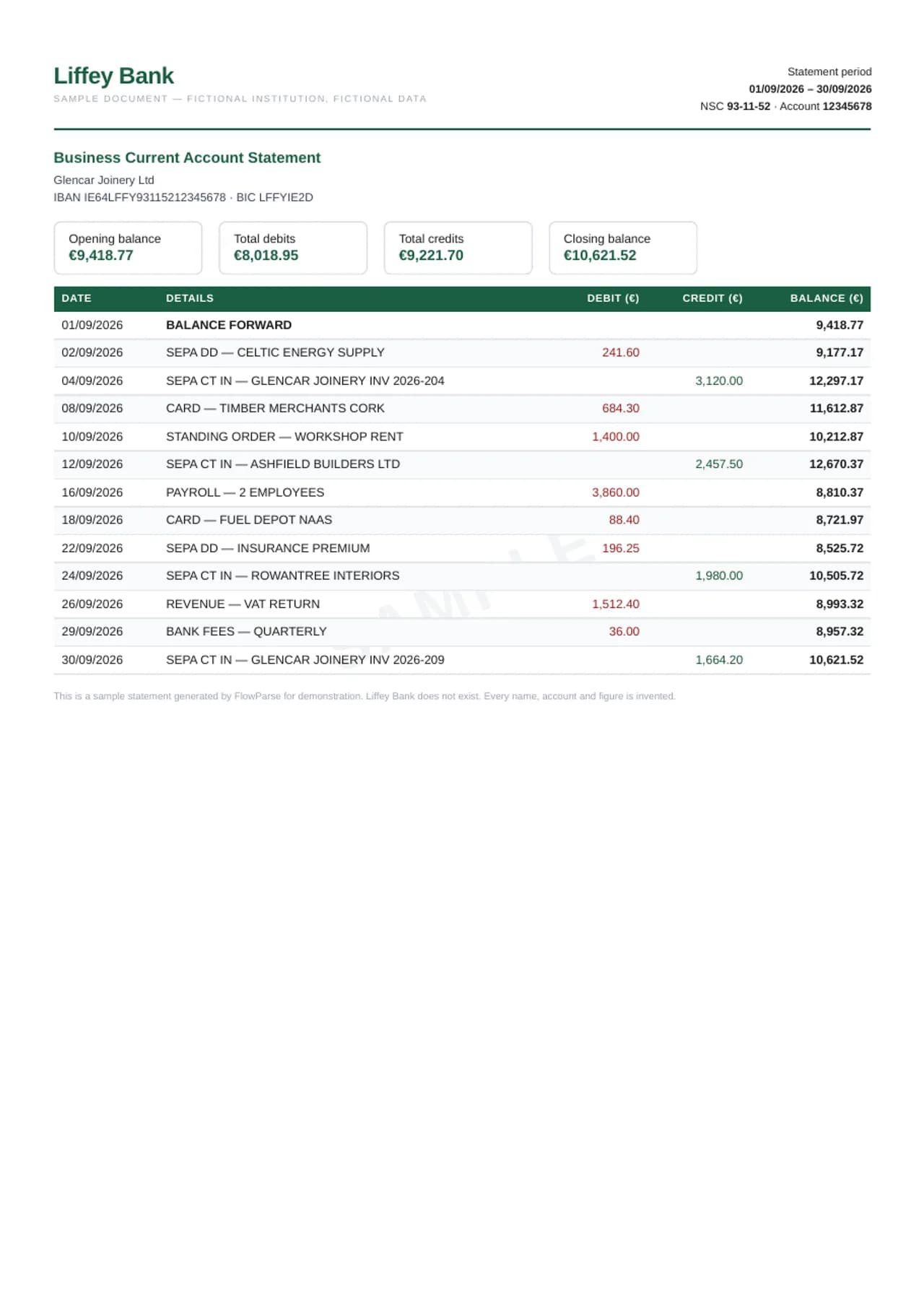
FlowParse turns an ING Kontoauszug into rows: booking date, Valuta, the text with the counterparty, IBAN and Verwendungszweck, and the amount in euros with its sign — German amounts like 1.234,56 read correctly. The old balance plus every booking is checked against the new balance, and the result exports to Excel, CSV, or a bank file for DATEV, Lexware, sevDesk or any other bookkeeping software.
AI extraction, no templates
Reads this bank's layout with no per-bank setup.
Every column preserved
Date, description, amount, balance and every extra field, 1:1.
Balance-validated
Opening + transactions = closing, checked on every file.
Scanned & multi-page
OCR for image PDFs; long statements stitched into one list.
What FlowParse reads from an ING Kontoauszug
An ING Kontoauszug for the Girokonto gives the account holder, the IBAN, the statement date and period, and the old balance, then the bookings: a booking date and a Valuta, the type of transaction — Lastschrift, Gutschrift, Überweisung, Entgelt, a VISA debit card payment — with the counterparty, its IBAN and the Verwendungszweck, and the signed amount. It closes with the new balance.
FlowParse keeps the booking date as the row's date and the Valuta in its own column, keeps the full text in one cell, and writes each amount as a signed number in euros. The period and the new balance go into the export's summary, so a workbook built from many statements still shows which Auszug each row came from.
| Field | Captured in the export |
|---|---|
| Date | Transaction / posting date, normalised |
| Description | Payee, merchant or transfer detail, verbatim |
| Amount | Single signed value (debits −, credits +) |
| Balance | Running balance per transaction |
| Reference / type | Check number, transaction type, reference |
The Post-Box: ten years, then announced cleanups
ING's help on the Post-Box draws a line between kinds of documents. Account- and custody-related documents — Kontoauszüge among them — can be deleted after ten years; general information and personal messages after one year. ING tidies the Post-Box at regular intervals and announces any automatic deletion a year ahead, so it advises checking the inbox and the archive regularly.
For important documents — account, custody, tax and annual documents — ING also sends an e-mail, citing a ruling of the European Court of Justice. Statements, in other words, are kept long and announced clearly. What the Post-Box does not do is turn them into data; that is the step FlowParse adds.
New to this? Read the guide on how to convert a bank statement PDF to Excel.
A printout is only a copy
ING's own guide to keeping statements makes a point many people miss: in the view of the Federal Ministry of Finance, a printout of an electronic Kontoauszug is only a copy of the original. Anyone who has to keep statements should therefore not delete the digital document before the retention period ends.
The same applies to a spreadsheet. An Excel file made from the PDF — by hand or by FlowParse — is a working copy. Keep the PDFs from the Post-Box as the original, and use the converted, reconciled file for the bookkeeping, the tax return and the questions.
A year of ING statements in one workbook
A Steuererklärung, an EÜR, a Nebenkostenabrechnung or a Kreditantrag usually needs a whole year, often from the Girokonto, the Extra-Konto and another bank. Smart Merge takes up to 100 ING PDFs and builds one workbook with every booking in date order, the source file on every row, and a check that each statement's new balance is the next one's old balance — so a missing Auszug shows up as a break.
Statements from DKB, Sparkasse, Deutsche Bank or Commerzbank can go into the same workbook, matched column by column.
ING to DATEV, Lexware or your Steuerberater
German Steuerberater work mostly in DATEV, and freelancers and small businesses commonly use Lexware, lexoffice or sevDesk. All of them import bank movements from a file. FlowParse exports a CSV with booking date, Valuta, text and signed amount that fits a bank import, an Excel file for checking first, and a DATEV-ready layout for the Steuerberater.
Because the full booking text is kept — counterparty, IBAN, Verwendungszweck, Mandatsreferenz — each line can still be matched to its invoice after the import.
Getting a clean ING PDF before you convert
A Kontoauszug downloaded from the Post-Box carries real text — FlowParse reads it directly and every amount is what the bank printed. When the statements come from a client or a tenant, ask for those PDFs rather than screenshots of the banking app; a screenshot shows a list without the opening and closing balance, so nothing can be proved.
Upload each Auszug as one file so the proof can run from old to new balance, and for a year upload them together. Download them before an automatic cleanup — ING announces it a year ahead, which is plenty of time if someone reads the notice.
Common problems with ING statements, and how they are handled
German formats come first: 1.234,56 is text in an English-locale spreadsheet, and 03.04. is easily read as March 4th. FlowParse reads figures and dates the German way and writes real numbers and dates. Second, the text: a SEPA-Lastschrift with Mandatsreferenz and Gläubiger-ID, or a card payment abroad with a currency amount, runs over several lines and, copied by hand, becomes several rows. FlowParse keeps one booking per row.
Third, two accounts in one folder: the Girokonto and the Extra-Konto statements look alike, and transfers between them appear on both. Smart Merge keeps the source and the account on every row, so an internal transfer is visible as one, not counted as income.
Worked example: a landlord checks a tenant's application
A landlord asks an applicant for three months of statements. The applicant sends three ING Kontoauszüge as PDFs from the Post-Box. The landlord wants to see regular income and whether a rent-sized payment goes out each month. The figures here are an illustration, not a real person's.
Uploaded together, the statements become one sheet in date order. Each is proved against its own balances — so nothing was removed — and each new balance matches the next old balance, so no month is missing. Sorting by amount shows the salary; filtering the text shows the current rent. Statements that had been edited would no longer add up to their printed balances, which is exactly what the proof would show.
Checklist: ING statements for the Steuerberater, a landlord or the Finanzamt
Before you rely on converted ING statements, check four things. Coverage: every Auszug in the period, chained by balance — Smart Merge flags any break. Dates: the booking date is the one the balance follows; keep the Valuta for interest and for bookings at the year end.
The reconciled mark: every statement proved against its own balances before you use the totals. And keep the PDFs: a printout, or a spreadsheet, is only a copy of the electronic Kontoauszug — the original stays in your archive for as long as your retention period runs.
Which ING documents convert
The Kontoauszug for the Girokonto is the main one, and statements for the Extra-Konto and other savings accounts have the same shape: bookings between an old and a new balance, which FlowParse turns into rows and proves. Business account statements convert the same way.
Securities statements, the Jahressteuerbescheinigung and the annual account summary for the tax return summarise rather than list movements. They are references, not inputs for a bank reconciliation. Keep them in the Post-Box archive; convert the Kontoauszüge.
From PDF to clean data in three steps
1 · Upload the PDF
Drop one statement or many — digital or scanned, any number of pages.
2 · AI extracts & validates
Every transaction is read, amounts signed, balances checked, weak pages retried.
3 · Review & export
Check the editable preview, then download Excel, CSV, QBO, QFX, OFX or Xero.
For ING the PDF is a Kontoauszug from the Post-Box — ING has no branches, so that is the only way statements arrive.
Convert to the format you need
The same extraction powers every export — convert once, then choose the output your next tool expects.
ING keeps account documents in the Post-Box for at least ten years, as PDFs; FlowParse turns them into rows.
| Format | Best for |
|---|---|
| Excel (.xlsx) | Analysis, totals, sharing |
| CSV | Importing into any tool |
| .QBO | QuickBooks Online & Desktop |
| .QFX | Quicken |
| .OFX | Most accounting tools |
| Xero CSV | Xero statement import |
Manual work vs FlowParse
Re-typing a statement by hand is slow and error-prone. FlowParse is near-instant, accurate, and scales to any volume.
By hand, an ING PDF pastes as text — 1.234,56 is not a number in Excel, and a Lastschrift with Mandatsreferenz becomes several rows.
| What happens | By hand | FlowParse |
|---|---|---|
| Reading the data | Copy-paste line by line | AI extracts every transaction |
| Scanned statements | Re-typed manually | OCR reads them automatically |
| Debits & credits | You fix every sign | Pre-signed, normalised |
| Balance check | Manual reconciliation | Validated automatically |
| Time per statement | 20–40 minutes | Under a minute |
| A full year | Hours per account | One Smart Merge upload |
A whole year into one reconciled Excel
Each ING Kontoauszug prints an old and a new balance. FlowParse checks the statement as a whole — old balance plus the sum of all bookings equals the new balance — and, where a running balance is printed, each row against the one before it. A misread amount, or a booking lost at a page break, fails exactly where it happened.
Only a statement that passes is marked as reconciled. Anything else is shown in the preview with the gap and the bookings around it, before you download.
Import straight into your accounting software
Need it in your books? FlowParse builds a real bank-feed file. The .QBO imports directly into QuickBooks with no CSV column mapping, each transaction carries a unique ID so re-imports never duplicate, and Quicken users get .QFX.
In Germany that usually means DATEV at the Steuerberater, or Lexware, lexoffice and sevDesk in the business.
Validated, not just converted
ING's guide sums up the periods. Anyone obliged to keep books — the self-employed, companies — keeps statements for ten years. Private individuals with income above EUR 500,000 a year keep them for six years. Proof of payment for trade work on a house or flat must be kept for two years. For everyone else there is no legal duty, but the three-year limitation period is a sensible orientation, because a statement can prove that a payment was made.
Whatever your period, the PDFs are what you keep — and when a question comes up years later, FlowParse turns the relevant years back into a sheet you can search in minutes.
More on the validation and reconciliation engines.
Your bank statements stay private
Bank statements are among the most sensitive documents you own. Converting one never puts it at risk.
Your ING PDF is deleted automatically 30 days after upload.
Encrypted transfer
Every upload and download runs over TLS.
Auto-deleted in 30 days
Your original PDF is removed automatically 30 days after upload.
EU servers
Stored on servers in the EU.
No AI training
Your documents are never used to train models. GDPR-aligned.
Read the full security overview.
Who converts these statements
Steuerberater, freelancers preparing an EÜR, landlords checking a tenant's statements, and households preparing a tax return.
Accountants
Bring client statements into Excel or QuickBooks without re-keying.
Bookkeepers
Catch up months of statements in minutes.
Small businesses
Get PDF-only statements into the books, ready for tax time.
Loan & mortgage applicants
Turn statements into a clean spreadsheet for underwriting.
Finance teams
Standardise statements from many banks into one format.
Anyone with a PDF statement
Skip the manual typing — convert and move on.
Explore the bank statement toolkit
For other German banks, see the DKB, Sparkasse, Deutsche Bank and Commerzbank converters.